Préférences liées aux notifications
Utilisez cette procédure pour vous assurer de recevoir des mises à jour importantes, personnaliser les notifications que vous recevez et désactiver les notifications dont vous n'avez pas besoin.
Pour plus d'informations sur l'affichage des notifications dans le portail, consultez Centre de notifications .
Types de notification
Des options sont disponibles pour :
| Type de notification | Description | Autorisations requises |
|---|---|---|
| Préférences liées aux notifications de commande | Recevez des notifications par e-mail pour les événements commande reçue, commande planifiée, commande terminée et commande modifiée. | n/a |
| Préférences de notifications IBX | Recevez des notifications pour les événements de maintenance IBX, les incidents IBX, les incidents de sécurité IBX et les alertes IBX. Remarque : les notifications Smart View (pour les alertes et les événements de maintenance) sont gérées dans Equinix Smart View. Pour plus d'informations, consultez la documentation Equinix Smart View . | Autorisation pour les notifications des services gérés |
| Préférences de notifications réseau | Recevez des notifications pour les événements de maintenance réseau et les incidents réseau. | Autorisation pour les notifications des services gérés |
| Préférences de notification des services gérés | Recevez des notifications pour les événements de maintenance IBX des services gérés, les événements de maintenance du réseau des services gérés et les incidents de services gérés. | Autorisation pour les notifications des services gérés |
| Préférences de notification du Programme d'assistance Smart Hands | Recevez des notifications par e-mail sur l'utilisation de vos heures mensuelles du plan d'assistance et des heures prépayées du plan d'assistance. | Autorisations du programme d'assistance Smart Hands |
| Préférences des notifications d'envoi sans préavis | Recevez des notifications par e-mail lorsque des envois non annoncés arrivent à vos IBX. | Autorisation pour les notifications des services gérés |
| Préférences de notification d’équipement virtuel | Recevez des notifications sur les ressources virtuelles Fabric et Network Edge. | Autorisation – Notification d’équipement virtuel |
| Préférences de notification concernant la violation des politiques IBX | Recevez des notifications concernant les violations des politiques IBX (telles que l'application de notre politique sur les matériaux combustibles et de notre politique de gestion des flux d'air). Au moins deux administrateurs de votre organisation doivent être configurés pour recevoir les violations de stratégie IBX. Remarque : si une violation n'est pas corrigée dans le délai imparti, une commande Smart Hands facturable est créée automatiquement. Les techniciens IBX corrigeront le problème et votre entreprise devra payer des frais Smart Hands. | Autorisation pour les notifications des services gérés |
Important : si l'une des vignettes Préférences de notification est grisée, cela indique que vous n'avez pas les autorisations nécessaires pour recevoir ces notifications. Contactez l'administrateur du Portail clients de votre entreprise pour demander des autorisations ou reportez-vous à la pageautorisations.
Mise à jour de vos préférences de notification
Pour modifier vos préférences de notification dans le Portail clients :
-
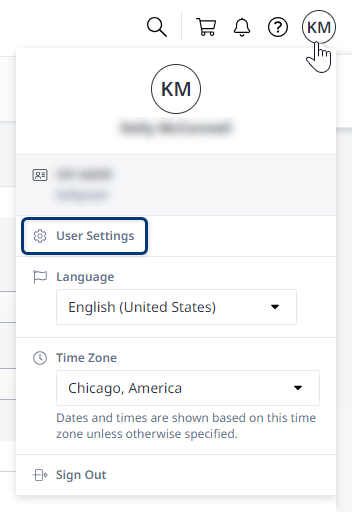
Cliquez sur votre nom d'utilisateur dans l'en-tête du profil global et sélectionnez Paramètres utilisateur.
-
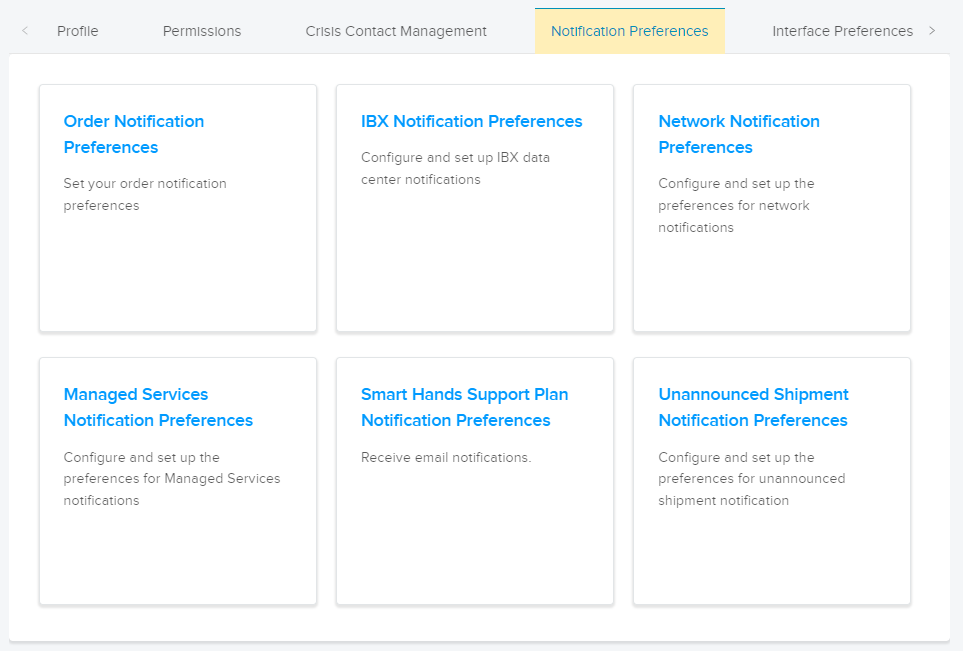
Cliquez sur l'onglet Préférences de notification et sélectionnez une catégorie.
-
Choisissez le(s) type(s) de notifications souhaité(s).
Pour certaines catégories, vous pouvez uniquement recevoir des notifications par e-mail. Pour les autres, vous pouvez choisir de recevoir des e-mails, des SMS (SMS) et/ou des notifications vocales.
noteLes notifications vocales ne sont pas prises en charge pour les téléphones en Chine.
-
Cliquez sur Envoyer pour confirmer vos modifications.
Répétez ces étapes pour définir vos préférences pour d'autres catégories de notification.