Gestion des abonnements
Utilisez les API de gestion des abonnements pour gérer la transmission des données de télémétrie à votre collecteur de données.
Conditions préalables
-
Avant d'appeler les API de gestion des abonnements, reportez-vous à Configuration du collecteur de données pour configurer le type de récepteur de votre choix.
-
Pour créer des abonnements, vous devez disposer du
Fabric Stream Subscription Managerrôle (STREAM_SUBSCRIPTION PERMISSION CREATE AND READ). Contactez l'administrateur de votre société ou l'administrateur IAM pour gérer les accès et les rôles. -
Si vous utilisez l'API, soumettez vos informations d'identification utilisateur, ID client et secret client pour l'authentification OAuth2. Reportez-vous à authentification API pour plus d'informations sur l'authentification de vos requêtes auprès de l'API Equinix.
Créer un abonnement
- Portal
- API
Le portail prend en charge la création et la gestion des abonnements à Splunk, Datadog, Microsoft Teams et PagerDuty.
-
Connectez-vous au portail client > Tableau de bord Fabric.
-
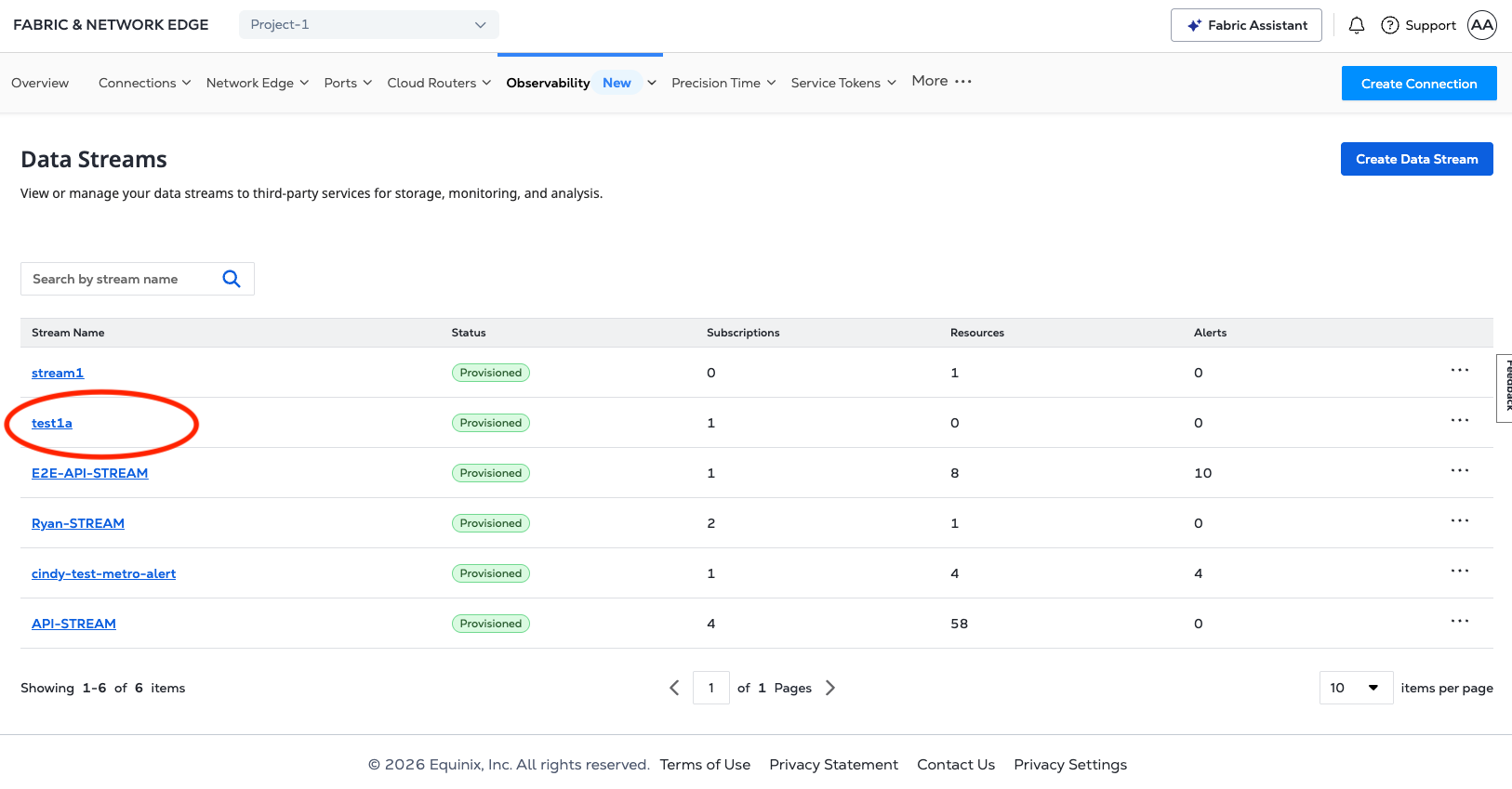
Dans le menu observabilité, sélectionnez flux de données.

-
Dans le menu déroulant actions, sélectionnez Ajouter des abonnements.

-
Sélectionnez le collecteur de données de votre abonnement dans le menu déroulant. Reportez-vous aux exemples ci-dessous pour connaître les collecteurs de données pris en charge.
Pour créer un abonnement, envoyez POST une demande au /fabric/v4/streams/<streamId>/subscriptionsnoeud final. Spécifiez l'ID de flux dans l'streamobjet et les paramètres de votre collecteur de données et les informations d'authentification dans l'sinkobjet dans le corps de la demande.
Reportez-vous aux exemples ci-dessous pour créer un abonnement de flux pour les collecteurs de données pris en charge.
Les valeurs URI/hôte de l'API d'abonnement prennent uniquement en charge HTTPS et ne prennent pas en charge les certificats auto-signés.
Datadog
- Portal
- API
- Event
- Metric
Sur la page Ajouter un abonnement, entrez vos informations Datadog, notamment :
- Un nom d'abonnement
- Votre URL d'hôte Datadog
- Votre clé API Datadog
- Votre clé d'application Datadog
- et fournissez une description (facultatif)

Utilisez la table de référence de site Datadog pour trouver votre paramètre de site pour le sink.host paramètre.
Exemple de demande de curl :
curl -X 'POST' 'https://api.equinix.com/fabric/v4/streams/<streamId>/subscriptions' \
-H 'Content-Type: application/json' \
-H 'Authorization: Bearer <Bearer Token>' \
-d '{
"type": "STREAM_SUBSCRIPTION",
"name": "<datadog_subscription_name>",
"description": "<datadog_subscription_desc>",
"sink": {
"host": "https://<datadog_site_parameter>",
"type": "DATADOG",
"credential": {
"type": "API_KEY",
"apiKey": "<datadog_api_key>"
},
"settings": {
"applicationKey": "<datadog_application_key>"
}
}
}'
Exemple de réponse :
{
"href": "https://api.equinix.com/fabric/v4/streams/241372e9-79c9-4ef8-b77a-8b8176c228b4/subscriptions/1a39648d-c407-4470-b08b-454965f31bf4",
"uuid": "1a39648d-c407-4470-b08b-454965f31bf4",
"type": "STREAM_SUBSCRIPTION",
"name": "datadog_subscription",
"description": "datadog_subscription_desc",
"state": "PROVISIONED",
"enabled": true,
"sink": {
"host": "https://<datadog_site_parameter>",
"type": "DATADOG",
"credential": {
"type": "API_KEY",
"apiKey": "<encrypted_datadog_api_key>"
},
"batchEnabled": false,
"batchSizeMax": 50,
"batchWaitTimeMax": 5,
"settings": {
"metricUri": "https://<datadog_site_parameter>/api/v2/series",
"eventUri": "https://<datadog_site_parameter>/api/v1/events"
}
},
"changeLog": {
"createdBy": "user1",
"createdDateTime": "2024-10-07T06:48:45.861755Z",
"updatedDateTime": "2024-10-07T06:48:51.514474Z"
}
}
---
date_happened: 1719864741 # in seconds
source_type_name: Equinix
aggregation_key: NCAB543WC4lrLpET8nLX4Vd8
title: 'Virtual port status changed to Up'
status: info # INFO->info, WARN -> warn, ERROR->error, CRITICAL->warn, FATAL->error, default: info
text: "{\"cloudevent\":{\"specversion\":\"1.0\",\"source\":\"https://api.equinix.com/fabric/v4/cloudevents\",\"id\":\"6c573287-9914-4202-8b6d-2d15e7da04b8\",\"type\":\"equinix.fabric.port.status.up\",\"subject\":\"/fabric/v4/ports/956a86fb-d03d-436c-8d5d-30d1f51f7688\",\"time\":\"2024-07-01T20:12:21.306Z\",\"severitynumber\":9,\"severitytext\":\"INFO\",\"equinixalert\":\"clear/NCAB543WC4lrLpET8nLX4Vd8\",\"equinixproject\":\"123\",\"data\":{\"message\":\"Virtual port status changed to Up\",\"resource\":{}}}}"
---
series:
- type: 3 # 0(unspecified), 1(count), 2(rate), 3(gauge)
metric: equinix.fabric.port.bandwidth_rx.usage
resources:
- type: subject
name: /fabric/v4/ports/956a86fb-d03d-436c-8d5d-30d1f51f7688
- type: equinixproject
name: 123
unit: bit/s
points:
- timestamp: 1719889941
value: 440023
- type: 1
metric: equinix.fabric.port.packets_erred_tx.count
resources:
- type: subject
name: /fabric/v4/ports/956a86fb-d03d-436c-8d5d-30d1f51f7688
- type: equinixproject
name: 123
unit: packet
interval: 300 # in seconds
points:
- timestamp: 1719889941
value: 10
Google PubSub
- Portal
- API
Sur la page Ajouter un abonnement, saisissez vos informations Google Cloud PubSub, notamment :
- Un nom d'abonnement
- Jeton d'accès Google Cloud PubSub
- URI de l'abonnement Google Cloud PubSub
- Et fournissez une description (facultatif)

curl -X POST 'https://api.equinix.com/fabric/v4/streams/<streamId>/subscriptions' \
-H 'Content-Type: application/json' \
-H 'Authorization: Bearer <Bearer Token>' \
-d '{
"type": "STREAM_SUBSCRIPTION",
"name": "<gcp_pubsub_subscription_name>",
"description": "<gcp_pubsub_subscription_desc>",
"sink": {
"uri": "https://pubsub.googleapis.com/v1/projects/<gcp_project_name>/topics/<gcp_topic_name>:publish",
"type": "GOOGLE_PUBSUB",
"credential": {
"type": "ACCESS_TOKEN",
"accessToken": "<encoded_base64_service_account_json>"
}
}
}'
Exemple de réponse :
{
"href": "https://api.equinix.com/fabric/v4/streams/241372e9-79c9-4ef8-b77a-8b8176c228b4/subscriptions/12190e7d-a486-4a77-ba56-fecdab616837",
"uuid": "12190e7d-a486-4a77-ba56-fecdab616837",
"type": "STREAM_SUBSCRIPTION",
"name": "<gcp_pubsub_subscription_name>",
"description": "<gcp_pubsub_subscription_desc>",
"state": "PROVISIONED",
"enabled": true,
"sink": {
"uri": "https://pubsub.googleapis.com/v1/projects/<gcp_project_name>/topics/<gcp_topic_name>:publish",
"type": "GOOGLE_PUBSUB",
"credential": {
"type": "ACCESS_TOKEN"
},
"batchEnabled": false,
"batchSizeMax": 50,
"batchWaitTimeMax": 5
},
"changeLog": {
"createdBy": "user1",
"createdDateTime": "2025-04-28T21:23:02.006057019Z"
}
}
Grafana Webhook
- Portal
- API
- CloudEvent
- CloudEvents Metric
- OpenTelemetry Log
- OpenTelemetry Metric
Sur la page Ajouter un abonnement, saisissez vos informations Grafana, notamment :
- Un nom d'abonnement.
- URI des métriques Grafana.
- Les événements Grafana Uri.
- Votre clé API Grafana.
- Une description facultative.

Exemple de demande de curl :
curl -X POST 'https://api.equinix.com/fabric/v4/streams/<streamId>/subscriptions' \
-H 'Content-Type: application/json' \
-H 'Authorization: Bearer <Bearer Token>' \
-d '{
"type": "STREAM_SUBSCRIPTION",
"name": "<webhook_subscription_name>",
"description": "<webhook_subscription_desc>",
"enabled": true,
"sink": {
"type": "WEBHOOK"
"settings": {
"eventUri": "https://<grafana_oltp_endpoint>/otlp/v1/logs",
"metricUri": "https://<grafana_oltp_endpoint>/otlp/v1/metrics",
"format": "OPENTELEMETRY"
},
"credential": {
"type": "API_KEY",
"apiKey": "<granfana_instance_id>:<grafana_api_key>",
}
}
}'
Exemple de réponse :
{
"href": "https://api.equinix.com/fabric/v4/streams/241372e9-79c9-4ef8-b77a-8b8176c228b4/subscriptions/1a39648d-c407-4470-b08b-454965f31bf4",
"uuid": "1a39648d-c407-4470-b08b-454965f31bf4",
"type": "STREAM_SUBSCRIPTION",
"name": "datadog_subscription",
"description": "datadog_subscription_desc",
"state": "PROVISIONED",
"enabled": true,
"sink": {
"host": "https://<datadog_site_parameter>",
"type": "DATADOG",
"credential": {
"type": "API_KEY",
"apiKey": "<encrypted_datadog_api_key>"
},
"batchEnabled": false,
"batchSizeMax": 50,
"batchWaitTimeMax": 5,
"settings": {
"metricUri": "https://<datadog_site_parameter>/api/v2/series",
"eventUri": "https://<datadog_site_parameter>/api/v1/events"
}
},
"changeLog": {
"createdBy": "user1",
"createdDateTime": "2024-10-07T06:48:45.861755Z",
"updatedDateTime": "2024-10-07T06:48:51.514474Z"
}
}
---
specversion: '1.0'
source: https://api.equinix.com/fabric/v4/cloudevents
id: 6c573287-9914-4202-8b6d-2d15e7da04b8
type: equinix.fabric.metric
subject: /fabric/v4/ports/956a86fb-d03d-436c-8d5d-30d1f51f7688
time: '2024-07-01T20:12:21.306Z'
severitynumber: 9
severitytext: INFO
equinixproject: 123
dataschema: https://github.com/Fabric/.../ApiConfigEventData.json
datacontenttype: application/json
data:
message: New metrics collected
resource:
href: https://api.equinix.com/fabric/v4/ports/956a86fb-d03d-436c-8d5d-30d1f51f7688
uuid: 956a86fb-d03d-436c-8d5d-30d1f51f7688
name: my-test-port
description: port description
metrics:
- type: GAUGE
name: equinix.fabric.port.bandwidth_rx.usage
description: Port inbound bandwidth utilization
unit: bit/s
datapoints:
- endDateTime: '2024-07-01T20:12:21.000Z'
value: 440023
- type: SUM
name: equinix.fabric.port.packets_erred_tx.count
description: Port error packets
interval: PT5M
unit: packet
datapoints:
- endDateTime: '2024-07-01T20:12:21.000Z'
value: 10
{
"specversion": "1.0",
"source": "https://api.equinix.com/fabric/v4/cloudevents",
"id": "16c7e20a-d147-40c4-81ad-f60d25548aad",
"time": "2026-06-24T20:20:59.000Z",
"type": "equinix.fabric.metric",
"subject": "/fabric/v4/ports/956a86fb-d03d-436c-8d5d-30d1f51f7688",
"dataschema": "https://equinix.github.io/equinix-cloudevents/jsonschema/equinix/fabric/v1/MetricEvent.json",
"datacontenttype": "application/json",
"severitynumber": "9",
"severitytext": "INFO",
"equinixproject": "123",
"data": {
"message": "Metrics collected",
"resource": {
"href": "https://api.equinix.com/fabric/v4/ports/956a86fb-d03d-436c-8d5d-30d1f51f7688",
"uuid": "956a86fb-d03d-436c-8d5d-30d1f51f7688",
"type": "XF_PORT",
"state": "PROVISIONED"
},
"metrics": [
{
"type": "GAUGE",
"name": "equinix.fabric.port.bandwidth_rx.usage",
"unit": "bit/s",
"datapoints": [
{
"endDateTime": "2026-06-24T20:20:59.000Z",
"value": 179
}
]
},
{
"type": "GAUGE",
"name": "equinix.fabric.port.bandwidth_tx.usage",
"unit": "bit/s",
"datapoints": [
{
"endDateTime": "2026-06-24T20:20:59.000Z",
"value": 1711
}
]
}
]
}
}
---
resourceLogs:
- resource:
attributes:
- key: service.name
value:
stringValue: Equinix
- key: equinix.event.specversion
value:
stringValue: '1.0'
- key: equinix.event.source
value:
stringValue: https://api.equinix.com/fabric/v4/cloudevents
- key: equinix.event.subject
value:
stringValue: /fabric/v4/ports/956a86fb-d03d-436c-8d5d-30d1f51f7688
- key: equinix.event.equinixproject
value:
stringValue: 123
scopeLogs:
- scope:
logRecords:
- timeUnixNano: '1719889941306000000'
severityNumber: 9
severityText: Information
body:
stringValue: '{"message":"Virtual port status changed to Up","resource":{"href":"https://api.equinix.com/fabric/v4/ports/956a86fb-d03d-436c-8d5d-30d1f51f7688","uuid":"956a86fb-d03d-436c-8d5d-30d1f51f7688","name":"my-test-port","description":"port description"}}'
attributes:
- key: equinix.event.id
value:
stringValue: 6c573287-9914-4202-8b6d-2d15e7da04b8
- key: equinix.event.type
value:
stringValue: equinix.fabric.port.status.up
---
resourceMetrics:
- resource:
attributes:
- key: service.name
value:
stringValue: Equinix
- key: equinix.event.specversion
value:
stringValue: '1.0'
- key: equinix.event.source
value:
stringValue: https://api.equinix.com/fabric/v4/cloudevents
- key: equinix.event.subject
value:
stringValue: /fabric/v4/ports/956a86fb-d03d-436c-8d5d-30d1f51f7688
- key: equinix.event.equinixproject
value:
stringValue: 123
scopeMetrics:
- scope:
metrics:
- name: equinix.fabric.port.bandwidth_rx.usage
description: Port inbound bandwidth utilization
unit: 'bit/s'
gauge:
dataPoints:
- attributes:
- key: service.name
value:
stringValue: Equinix
- key: equinix.event.source
value:
stringValue: https://api.equinix.com/fabric/v4/cloudevents
- key: equinix.event.subject
value:
stringValue: /fabric/v4/ports/956a86fb-d03d-436c-8d5d-30d1f51f7688
- key: equinix.event.equinixproject
value:
stringValue: 123
- key: equinix.event.resource.name
value:
stringValue: 'my-port-name'
timeUnixNano: '1719889941306000000'
asInt: 566
- name: equinix.fabric.port.packets_erred_tx.count
description: Port error packets
unit: packet
sum:
aggregationTemporality: 2 # required for sum https://github.com/open-telemetry/opentelemetry-proto/blob/v0.9.0/opentelemetry/proto/metrics/v1/metrics.proto#L230
dataPoints:
- attributes:
- key: service.name
value:
stringValue: Equinix
- key: equinix.event.source
value:
stringValue: https://api.equinix.com/fabric/v4/cloudevents
- key: equinix.event.subject
value:
stringValue: /fabric/v4/ports/956a86fb-d03d-436c-8d5d-30d1f51f7688
- key: equinix.event.equinixproject
value:
stringValue: 123
- key: equinix.event.resource.name
value:
stringValue: 'my-port-name'
startTimeUnixNano: '1719889641306000000' # optional
timeUnixNano: '1719889941306000000'
asInt: 10
Microsoft Teams
- Portal
- API
Sur la page Ajouter un abonnement, saisissez les informations relatives à Microsoft Teams, notamment :
- Un nom d'abonnement
- Votre URI Microsoft Workflow Webhook
- et fournissez une description (facultatif)

Exemple de demande de curl :
curl -X 'POST' 'https://api.equinix.com/fabric/v4/streams/<streamId>/subscriptions' \
-H 'Content-Type: application/json' \
-H 'Authorization: Bearer <Bearer Token>' \
-d '{
"type": "STREAM_SUBSCRIPTION",
"name": "<ms_teams_subscription>",
"description": "<ms_teams_subscription_desc>",
"sink": {
"uri": "<teams_webhook_uri>",
"type": "TEAMS"
}
}'
Exemple de réponse :
{
"href": "https://api.equinix.com/fabric/v4/streams/241372e9-79c9-4ef8-b77a-8b8176c228b4/subscriptions/12190e7d-a486-4a77-ba56-fecdab616837",
"uuid": "12190e7d-a486-4a77-ba56-fecdab616837",
"type": "STREAM_SUBSCRIPTION",
"name": "ms_teams_subscription",
"description": "ms_teams_subscription_desc",
"state": "PROVISIONED",
"enabled": true,
"sink": {
"uri": "****",
"type": "TEAMS",
"batchEnabled": false,
"batchSizeMax": 50,
"batchWaitTimeMax": 5
},
"changeLog": {
"createdBy": "user1",
"createdDateTime": "2024-10-04T13:20:40.127727Z"
}
}
PagerDuty
- Portal
- API
- Event
Sur la page Ajouter un abonnement, saisissez vos informations PagerDuty, notamment :
- Un nom d'abonnement
- Votre URL d'hôte PagerDuty
- Votre clé d'intégration PagerDuty
- et fournissez une description (facultatif)

Exemple de demande de curl :
curl -X 'POST' 'https://api.equinix.com/fabric/v4/streams/<streamId>/subscriptions' \
-H 'Content-Type: application/json' \
-H 'Authorization: Bearer <Bearer Token>' \
-d '{
"type": "STREAM_SUBSCRIPTION",
"name": "<pagerduty_subscription_name>",
"description": "<pagerduty_subscription_desc>",
"sink": {
"host": "https://events.pagerduty.com",
"type": "PAGERDUTY",
"credential": {
"type": "INTEGRATION_KEY",
"integrationKey": "<pagerduty_integration_key>"
}
}
}'
Exemple de réponse :
{
"href": "https://api.equinix.com/fabric/v4/streams/241372e9-79c9-4ef8-b77a-8b8176c228b4/subscriptions/dae0726a-87f0-4c5f-8662-ccbcf44a0de2",
"uuid": "dae0726a-87f0-4c5f-8662-ccbcf44a0de2",
"type": "STREAM_SUBSCRIPTION",
"name": "pagerduty-subscription",
"description": "pagerduty-subscription-desc",
"state": "PROVISIONED",
"enabled": true,
"sink": {
"host": "https://events.pagerduty.com",
"type": "PAGERDUTY",
"credential": {
"type": "INTEGRATION_KEY",
"integrationKey": "<encrypted_integration_key>"
},
"batchEnabled": false,
"batchSizeMax": 50,
"batchWaitTimeMax": 5,
"settings": {
"source": "equinix",
"changeUri": "https://events.pagerduty.com/v2/change/enqueue",
"alertUri": "https://events.pagerduty.com/v2/enqueue"
}
},
"changeLog": {
"createdBy": "user1",
"createdDateTime": "2024-09-18T22:04:58.664523Z"
}
}
---
routing_key: routingKey
dedup_key: NCAB543WC4lrLpET8nLX4Vd8
event_action: trigger # or resolve
payload:
source: Equinix
timestamp: '2024-07-01T20:12:21.306Z'
severity: critical
summary: Virtual port status changed to Down
custom_details:
equinixsource: https://api.equinix.com/fabric/v4/cloudevents
specversion: '1.0'
id: 6c573287-9914-4202-8b6d-2d15e7da04b8
type: equinix.fabric.port.status.down
subject: /fabric/v4/ports/956a86fb-d03d-436c-8d5d-30d1f51f7688
time: '2024-07-01T20:12:21.306Z'
severitynumber: 21
severitytext: FATAL # or INFO
equinixalert: raise/NCAB543WC4lrLpET8nLX4Vd8
equinixproject: 123
ServiceNow
- Portal
- API
- Event
- Metric
Sur la page Ajouter un abonnement, saisissez vos informations ServiceNow, notamment :
- Un nom d'abonnement.
- URL de l'hôte ServiceNow.
- Votre nom d'utilisateur ServiceNow.
- Votre mot de passe ServiceNow.
- Une description facultative.

Exemple de demande de curl :
curl -X 'POST' 'https://api.equinix.com/fabric/v4/streams/<streamId>/subscriptions' \
-H 'Content-Type: application/json' \
-H 'Authorization: Bearer <Bearer Token>' \
-d '{
"type": "STREAM_SUBSCRIPTION",
"name": "<servicenow_subscription_name>",
"description": "<servicenow_subscription_desc>",
"sink": {
"host": "https://<host>.service-now.com",
"type": "SERVICENOW",
"settings": {
"source": "<source_name>"
},
"credential": {
"type": "USERNAME_PASSWORD",
"username": "<servicenow-username>",
"password": "<servicenow-password>"
}
}
}'
Exemple de réponse :
{
"href": "https://api.equinix.com/fabric/v4/streams/241372e9-79c9-4ef8-b77a-8b8176c228b4/subscriptions/9b503760-b30f-4eb8-a681-aab1cfa9db1f",
"uuid": "9b503760-b30f-4eb8-a681-aab1cfa9db1f",
"type": "STREAM_SUBSCRIPTION",
"name": "servnow_subscription",
"description": "servnow_subscription_desc",
"state": "PROVISIONING",
"enabled": true,
"sink": {
"host": "https://<host>.service-now.com",
"type": "SERVICENOW",
"credential": {
"type": "USERNAME_PASSWORD"
},
"batchEnabled": false,
"batchSizeMax": 50,
"batchWaitTimeMax": 5,
"settings": {
"source": "source_name",
"metricUri": "https://<host>.service-now.com/api/mid/sa/metrics",
"eventUri": "https://<host>.service-now.com/api/global/em/jsonv2"
}
},
"changeLog": {
"createdBy": "user1",
"createdDateTime": "2025-01-22T18:09:20.894582046Z"
}
}
---
source: Equinix
time_of_event: '2024-07-01T20:12:21.306Z'
description: Virtual port status changed to Down
severity: 1 # 1 for clear and 0 for clear
resolution_state: New # or Closing
message_key: NCAB543WC4lrLpET8nLX4Vd8
resource: fabric.port
node: /fabric/v4/ports/956a86fb-d03d-436c-8d5d-30d1f51f7688
type: equinix.fabric.port.status.down
additional_info: '{"cloudevent":{"specversion":"1.0","source":"https://api.equinix.com/fabric/v4/cloudevents","id":"6c573287-9914-4202-8b6d-2d15e7da04b8","type":"equinix.fabric.port.status.down","subject":"/fabric/v4/ports/956a86fb-d03d-436c-8d5d-30d1f51f7681","time":"2024-07-01T20:12:21.306Z","severitynumber":13,"severitytext":"CRITICAL","equinixalert":"raise/NCAB543WC4lrLpET8nLX4Vd8","equinixproject":"123","data":{"message":"Virtual port named \'Test-port\' status changed to Down","resource":{}}}}'
---
- timestamp: 1719889941306000. #mili sec
source: Equinix
resource_path: "/fabric/v4/ports/956a86fb-d03d-436c-8d5d-30d1f51f7681"
metric_type: equinix.fabric.port.bandwidth_rx.utilization
value: 70.5
ci2metric_id:
type: GAUGE
subject: "/fabric/v4/ports/956a86fb-d03d-436c-8d5d-30d1f51f7681"
equinixproject: 123
unit: "%"
- timestamp: 1719889941306000 #mili sec
source: Equinix
resource_path: "/fabric/v4/ports/956a86fb-d03d-436c-8d5d-30d1f51f7681"
metric_type: equinix.fabric.port.packets_erred_tx.count
value: 70.5
ci2metric_id:
type: GAUGE
interval: PT5M
subject: "/fabric/v4/ports/956a86fb-d03d-436c-8d5d-30d1f51f7681"
equinixproject: 123
unit: "%"
Slack
- Portal
- API
- CloudEvent
- CloudEvent Metric
Sur la page Ajouter un abonnement, entrez vos informations Slack, notamment :
- Titulaire de l’abonnement
- URI d’abonnement
- Description (facultatif)

Exemple de demande de curl :
curl -X 'POST' 'https://api.equinix.com/fabric/v4/streams/<streamId>/subscriptions' \
-H 'Content-Type: application/json' \
-H 'Authorization: Bearer <Bearer Token>' \
-d '{
"type": "STREAM_SUBSCRIPTION",
"name": "<slack_subscription_name>",
"description": "<slack_subscription_desc>",
"sink": {
"uri": "<slack_webhook_uri>",
"type": "SLACK"
}
}'
Exemple de réponse :
{
"href": "https://api.equinix.com/fabric/v4/streams/241372e9-79c9-4ef8-b77a-8b8176c228b4/subscriptions/12190e7d-a486-4a77-ba56-fecdab616837",
"uuid": "12190e7d-a486-4a77-ba56-fecdab616837",
"type": "STREAM_SUBSCRIPTION",
"name": "slack_subscription",
"description": "slack_subscription_desc",
"state": "PROVISIONED",
"enabled": true,
"sink": {
"uri": "****",
"type": "SLACK",
"batchEnabled": false,
"batchSizeMax": 50,
"batchWaitTimeMax": 5
},
"changeLog": {
"createdBy": "user1",
"createdDateTime": "2024-10-04T13:20:40.127727Z"
}
}
---
cloudevent:
source: https://api.equinix.com/fabric/v4/cloudevents
specversion: '1.0'
id: 6c573287-9914-4202-8b6d-2d15e7da04b8
type: equinix.fabric.port.status.up
subject: /fabric/v4/ports/956a86fb-d03d-436c-8d5d-30d1f51f7688
time: '2024-07-01T20:12:21.306Z'
severitynumber: 9
severitytext: INFO
equinixalert: clear/NCAB543WC4lrLpET8nLX4Vd8
equinixproject: 123
data:
message: Virtual port status changed to Up
resource:
href: https://api.equinix.com/fabric/v4/ports/956a86fb-d03d-436c-8d5d-30d1f51f7688
uuid: 956a86fb-d03d-436c-8d5d-30d1f51f7688
name: my-test-port
description: port description
---
specversion: '1.0'
source: https://api.equinix.com/fabric/v4/cloudevents
id: 6c573287-9914-4202-8b6d-2d15e7da04b8
type: equinix.fabric.metric
subject: /fabric/v4/ports/956a86fb-d03d-436c-8d5d-30d1f51f7688
time: '2024-07-01T20:12:21.306Z'
severitynumber: 9
severitytext: INFO
equinixproject: 123
dataschema: https://github.com/equinixapis/.../ApiConfigEventData.json
datacontenttype: application/json
data:
message: New metrics collected
resource:
href: https://api.equinix.com/fabric/v4/ports/956a86fb-d03d-436c-8d5d-30d1f51f7688
uuid: 956a86fb-d03d-436c-8d5d-30d1f51f7688
name: my-test-port
description: port description
metrics:
- type: GAUGE
name: equinix.fabric.port.bandwidth_rx.usage
description: Port inbound bandwidth utilization
unit: bit/s
datapoints:
- endDateTime: '2024-07-01T20:12:21.000Z'
value: 440023
- type: SUM
name: equinix.fabric.port.packets_erred_tx.count
description: Port error packets
interval: PT5M
unit: packet
datapoints:
- endDateTime: '2024-07-01T20:12:21.000Z'
value: 10
Splunk
- Portal
- API
- Event
- Metric
Sur la page Ajouter un abonnement, saisissez vos informations Splunk, notamment :
- Un nom d'abonnement
- Votre URI du collecteur d'événements HTTP Splunk
- Votre jeton d'accès Splunk
- Votre index d'événements Splunk (obligatoire)
- Votre indice de métriques Splunk, si vous prévoyez d'ingérer des métriques dans Splunk
- et fournissez une description (facultatif)

Exemple de demande de curl :
curl -X 'POST' 'https://api.equinix.com/fabric/v4/streams/<streamId>/subscriptions' \
-H 'Content-Type: application/json' \
-H 'Authorization: Bearer <Bearer Token>' \
-d '{
"type": "STREAM_SUBSCRIPTION",
"name": "<splunk_subscription_name>",
"description": "<splunk_subscription_desc>",
"sink": {
"uri": "https://http-inputs-<host>.splunkcloud.com:<port>/services/collector/event"
"type": "SPLUNK_HEC",
"settings": {
"eventIndex": "<name_of_eventIndex>",
"metricIndex": "<name_of_metricIndex>",
"source": "<name_of_splunk_hec>"
},
"credential": {
"type": "ACCESS_TOKEN",
"accessToken": "Splunk <Splunk AccessToken>"
}
}
}'
Exemple de réponse :
{
"href": "https://api.equinix.com/fabric/v4/streams/241372e9-79c9-4ef8-b77a-8b8176c228b4/subscriptions/958a9854-dc49-4ded-87bd-be4d0099355e",
"uuid": "958a9854-dc49-4ded-87bd-be4d0099355e",
"type": "STREAM_SUBSCRIPTION",
"name": "eq-splunk ",
"description": "subscription1",
"state": "PROVISIONING",
"enabled": true,
"sink": {
"uri": "https://http-inputs-<host>.splunkcloud.com:<port>/services/collector/event",
"type": "SPLUNK_HEC",
"credential": {
"type": "ACCESS_TOKEN"
},
"batchEnabled": false,
"batchSizeMax": 50,
"batchWaitTimeMax": 5,
"settings": {
"eventIndex": "<name_of_eventIndex>",
"metricIndex": "<name_of_metricIndex>",
"source": "<name_of_splunk_hec>"
}
},
"changeLog": {
"createdBy": "user1",
"createdDateTime": "2024-08-12T21:49:21.761029359Z"
}
}
---
sourcetype: _json
index: test-event-index
source: equinix # optional
event:
equinixsource: https://api.equinix.com/fabric/v4/cloudevents
specversion: '1.0'
id: 6c573287-9914-4202-8b6d-2d15e7da04b8
type: equinix.fabric.port.status.up
subject: /fabric/v4/ports/956a86fb-d03d-436c-8d5d-30d1f51f7688
time: '2024-07-01T20:12:21.306Z'
severitynumber: 9
severitytext: INFO
equinixalert: clear/NCAB543WC4lrLpET8nLX4Vd8
equinixproject: 123
data:
message: Virtual port status changed to Up
resource:
href: https://api.equinix.com/fabric/v4/ports/956a86fb-d03d-436c-8d5d-30d1f51f7688
uuid: 956a86fb-d03d-436c-8d5d-30d1f51f7688
name: my-test-port
description: port description
---
time: 1719889941.306
event: metric
index: test-index-metric
source: Equinix # Optional
fields:
subject: /fabric/v4/ports/956a86fb-d03d-436c-8d5d-30d1f51f7688
equinixproject: 123
"metric_name:equinix.fabric.port.bandwidth_rx.usage": 440023
"metric_name:equinix.fabric.port.packets_erred_tx.count": 10
Generic Webhook
Créez un abonnement à n'importe quel service webhook générique pour les événements et les métriques. Spécifiez le type de récepteur en tant que webhook. Vous devez inclure un URI d'événement ou un URI de mesure. Pour diffuser à la fois des événements et des mesures, vous devez fournir à la fois un URI d'événement et un URI de mesure. Si vous ne fournissez qu'un seul de ces champs, seul le type de données correspondant (événements ou métriques) est envoyé à la plate-forme de destination.
- Portal
- API
Sur la page Ajouter un abonnement, entrez vos informations Webhook, notamment :
- Un nom d'abonnement
- Sélectionnez le format CloudEvent ou Open Telemetry pour vos données en streaming.
- URI de l'événement
- URI métrique
- Sélectionnez un type d'authentification parmi les options No Auth, Username/Password, Access Token ou API Key. Saisissez les informations pertinentes dans les champs prévus à cet effet.
- Et fournissez une description (facultatif).

Exemple de demande de curl :
curl -X POST 'https://api.equinix.com/fabric/v4/streams/<streamId>/subscriptions' \
-H 'Content-Type: application/json' \
-H 'Authorization: Bearer <Bearer Token>' \
-d '{
"type": "STREAM_SUBSCRIPTION",
"name": "<webhook_subscription_name>",
"description": "<webhook_subscription_desc>",
"enabled": true,
"sink": {
"type": "WEBHOOK",
"settings": {
"eventUri": "<webhook_uri>",
"metricUri": "<webhook_uri>",
"format": "<format>"
}
}
}'
Exemple de réponse :
{
"href": "https://api.equinix.com/fabric/v4/streams/241372e9-79c9-4ef8-b77a-8b8176c228b4/subscriptions/12190e7d-a486-4a77-ba56-fecdab616837",
"uuid": "12190e7d-a486-4a77-ba56-fecdab616837",
"type": "STREAM_SUBSCRIPTION",
"name": "<webhook_subscription_name>",
"description": "<webhook_subscription_desc>",
"state": "PROVISIONED",
"enabled": true,
"sink": {
"type": "WEBHOOK",
"batchEnabled": false,
"batchSizeMax": 50,
"batchWaitTimeMax": 5,
"settings": {
"eventUri": "<webhook_uri>",
"format": "CLOUDEVENT"
}
},
"changeLog": {
"createdBy": "user1",
"createdDateTime": "2025-04-30T15:31:34.528915714Z"
}
}
Affichage d'un abonnement
- Portal
- API
-
Dans le menu observabilité, cliquez sur flux de données.
-
Sélectionnez un flux dans l' inventaire des flux.

-
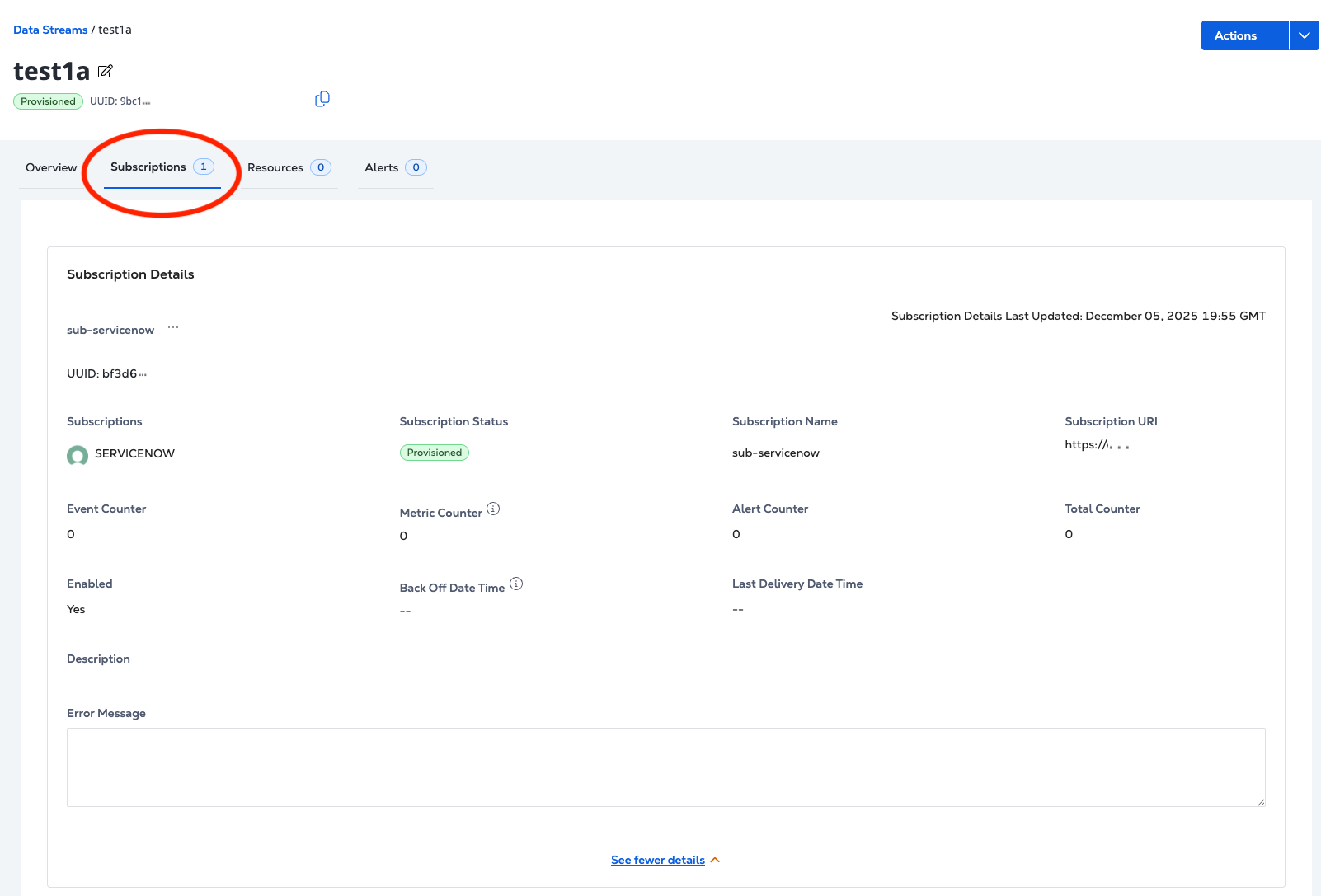
Sur la page Détails du flux, cliquez sur abonnements.

Pour récupérer les détails d'un abonnement, envoyez une GET demande au /fabric/v4/streams/{streamId}/subscriptions/{subscriptionId}noeud final.
Exemple de demande de curl :
curl -X 'GET' 'https://api.equinix.com/fabric/v4/streams/241372e9-79c9-4ef8-b77a-8b8176c228b4/subscriptions/557400f8-d360-11e9-bb65-2a2ae2dbcce4' \
-H 'Content-Type: application/json' \
-H 'Authorization: Bearer <Bearer Token>'
Exemple de réponse :
{
"href": "https://api.equinix.com/fabric/v4/streams/241372e9-79c9-4ef8-b77a-8b8176c228b4/subscriptions/958a9854-dc49-4ded-87bd-be4d0099355e",
"uuid": "958a9854-dc49-4ded-87bd-be4d0099355e",
"type": "STREAM_SUBSCRIPTION",
"name": "eq-splunk",
"description": "subscription1",
"state": "PROVISIONED",
"enabled": true,
"sink": {
"uri": "https://http-inputs-<host>.splunkcloud.com:<port>/<endpoint>",
"type": "SPLUNK_HEC",
"credential": {
"type": "ACCESS_TOKEN"
},
"settings": {
"eventIndex": "<name_of_eventIndex>",
"metricIndex": "<name_of_metricIndex>",
"source": "<name_of_splunk_hec>"
}
},
"changeLog": {
"createdBy": "user1",
"createdDateTime": "2024-08-12T21:49:21.761029Z"
}
}
Suppression d'un abonnement
- Portal
- API
-
Dans le menu observabilité, cliquez sur flux de données.
-
Sélectionnez un flux dans l' inventaire des flux.

-
Sur la page Détails du flux, cliquez sur abonnements.

-
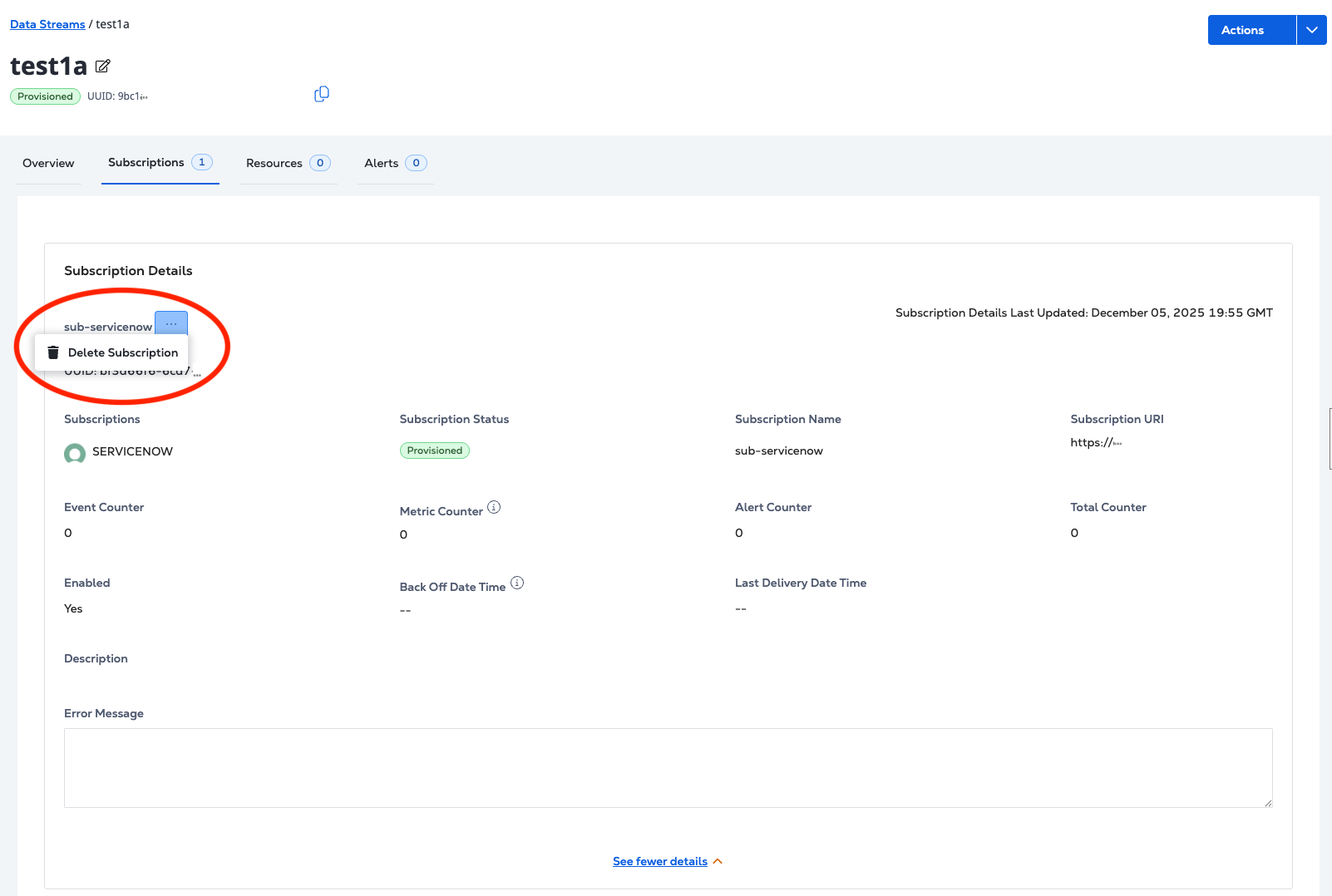
Dans Détails de l'abonnement, cliquez sur le menu Options
..., puis Supprimer l'abonnement.
Pour supprimer un abonnement, envoyez DELETEune demande au /fabric/v4/streams/{streamId}/subscriptions/{subscriptionId}noeud final.
Exemple de demande de curl :
curl -X 'DELETE' 'https://api.equinix.com/fabric/v4/streams/241372e9-79c9-4ef8-b77a-8b8176c228b4/subscriptions/557400f8-d360-11e9-bb65-2a2ae2dbcce4' \
-H 'Content-Type: application/json' \
-H 'Authorization: Bearer <Bearer Token>'
Exemple de réponse :
{
"href": "https://api.equinix.com/fabric/v4/streams/241372e9-79c9-4ef8-b77a-8b8176c228b4/subscriptions/958a9854-dc49-4ded-87bd-be4d0099355e",
"uuid": "958a9854-dc49-4ded-87bd-be4d0099355e",
"type": "STREAM_SUBSCRIPTION",
"name": "eq-splunk",
"description": "subscription1",
"state": "DEPROVISIONING",
"enabled": true,
"sink": {
"uri": "<protocol>://http-inputs-<host>.splunkcloud.com:<port>/<endpoint>",
"type": "SPLUNK_HEC",
"credential": {
"type": "ACCESS_TOKEN"
},
"settings": {
"eventIndex": "<name_of_eventIndex>",
"metricIndex": "<name_of_metricIndex>",
"source": "<name_of_splunk_hec>"
}
},
"changeLog": {
"createdBy": "user1",
"createdDateTime": "2024-08-12T21:49:21.761029Z"
}
}