Routeur Cisco Catalyst 8000V (mode contrôleur)
- Fiche technique du logiciel Cisco Catalyst 8000V Edge
- Guide de commande du logiciel Cisco DNA pour SD-WAN et routage
Options de licence
- BYOL (Bring Your Own License)
Types de déploiement
- Appareil unique
- Dispositifs redondants
Options de connectivité
- Avec une adresse IP publique
Détails de l'appareil
| 2 cœurs | 4 cœurs | 6 cœurs | 8 cœurs | 16 cœurs | |
|---|---|---|---|---|---|
| Mémoire | 8 GO | 8 GO | 16 GO | 16 GO | 16 GO |
| Progiciel | DNA Essentials Avantage ADN DNA premier | ||||
| Interfaces de données virtuelles prises en charge (par défaut/maximum) | 10 / 24 | ||||
| Interfaces réservées au système | GigabitEthernet 1 (gestion) Gigabit Ethernet 2 (WAN/SSH) | ||||
| Méthodes d'accès | HTTPS (console Web) vGestion | ||||
| Version de l'image | Voir les versions d'image disponibles | ||||
| Commandes CLI restreintes | Aucun |
Conditions préalables
Les conditions préalables au déploiement du Cisco Catalyst 8000V en mode contrôleur SD-WAN sont les suivantes :
- Informations d'identification de connexion de Cisco.com.
- Les licences DNA appropriées de Cisco.com pour approvisionner et exploiter le dispositif Catalyst 8000V. Cette licence est installée dans vManage, et non dans Equinix.
- Votre logiciel Cisco vManage (contrôleur) doit être en cours d'exécution et opérationnel (non géré par Equinix).
Générer un fichier de configuration Bootstrap
-
Connectez-vous au contrôleur Cisco vManage SD-WAN.
-
Localisez le périphérique SD-WAN Edge dans le contrôleur.
-
Dans le menu Cisco vManage, sélectionnez Configuration > périphériques.
-
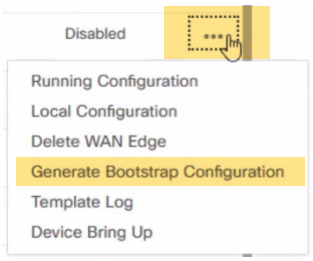
Sélectionnez le SD-WAN C8000V logique que vous utilisez pour votre nouveau périphérique Network Edge, cliquez sur les points de suspension et sélectionnez générer une configuration d'amorçage .
 remarque
Un numéro de châssis pour votre C8000V est renseigné en synchronisant votre compte Smart sur le Gestionnaire SD-WAN après le dépôt de votre licence sur votre compte Smart. Sélectionnez un numéro de châssis inutilisé pour générer le fichier d'amorçage. Il est important de suivre l'étape 4 ci-dessus avant de créer un profil.
-
Dans la fenêtre générer le BOX de configuration d'amorçage, sélectionnez Cloud-init et cliquez sur OK. L'option inclure le certificat racine par défaut est facultative.
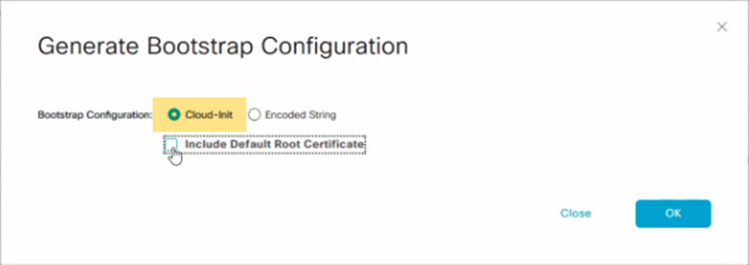
La boîte « Générer la configuration d'amorçage » affiche la configuration d'amorçage, y compris le jeton OTP pour la licence, l'adresse vBond, l'UUID et les informations sur l'organisation.
-
Cliquez sur Télécharger dans le BOX de génération de la configuration d'amorçage pour enregistrer une copie de la configuration d'amorçage.
-
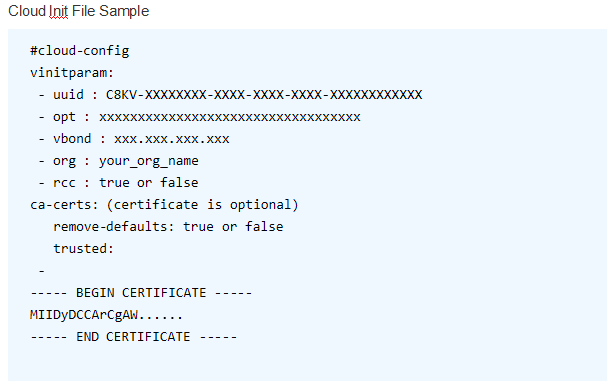
Validez le contenu de votre fichier d'amorçage pour vous assurer qu'aucune information supplémentaire n'est incluse. L'exemple ci-dessous montre le format et les attributs valides autorisés dans le fichier cloud-init à télécharger dans le flux de création de l'appareil C8000V.
 remarque
Voici un exemple de fichier cloud-init. Utilisez le fichier téléchargé depuis vManage et ne le modifiez pas. Pour obtenir la documentation la plus à jour sur la génération de bootstrap, consultez processus de bootstrap pour les périphériques hébergés dans le cloud Cisco SD-WAN .
-
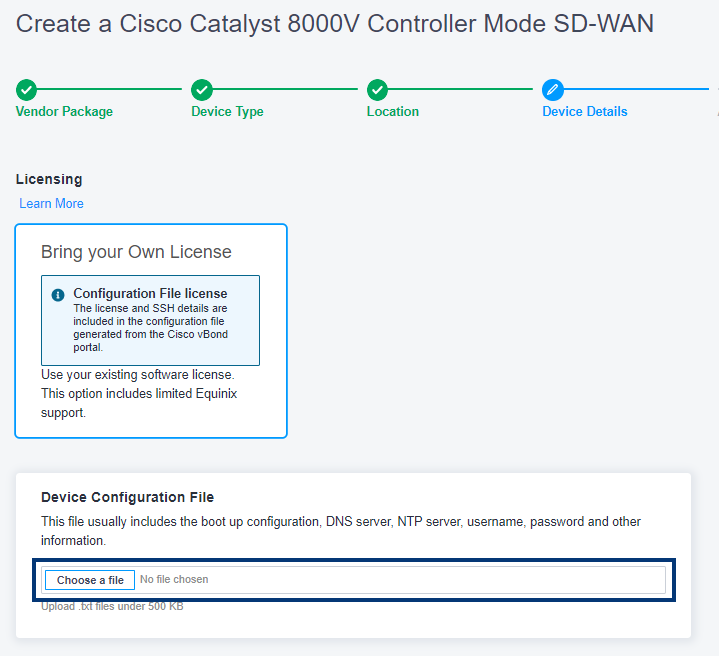
Lors de la configuration de votre appareil, vous devrez télécharger le fichier de configuration.