Manage Service Profile Connections
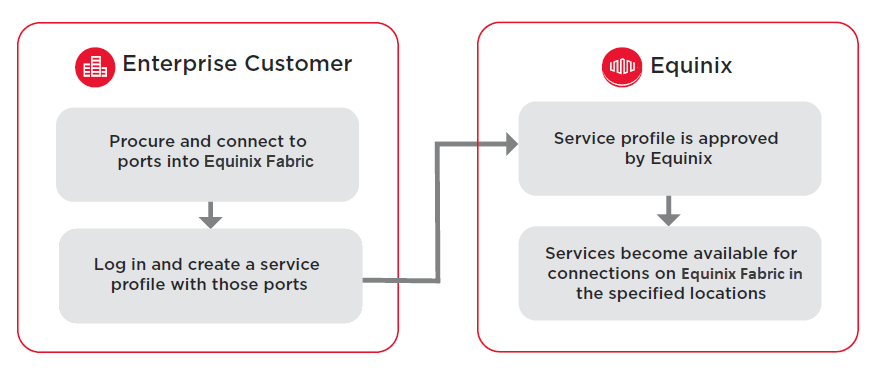
Once you have created a service profile, other Equinix Fabric users can make connections to your service.
Connection Configuration Options
When selecting the Ports that are part of your service profile, consider the type of traffic, encapsulation, and tagging that you and other Fabric customers need in order to connect to your service.
Service Providers and Fabric customers commonly use Dot1q-type ports, managing incoming connections to their service as multiple separate VLANs.
Some providers choose to use QinQ ports if they offer more than one subscription service. This allows their systems to identify an C-Tag as a single customer incoming on an aggregated port, and then the S-Tags that indicate the service for which it's bound.
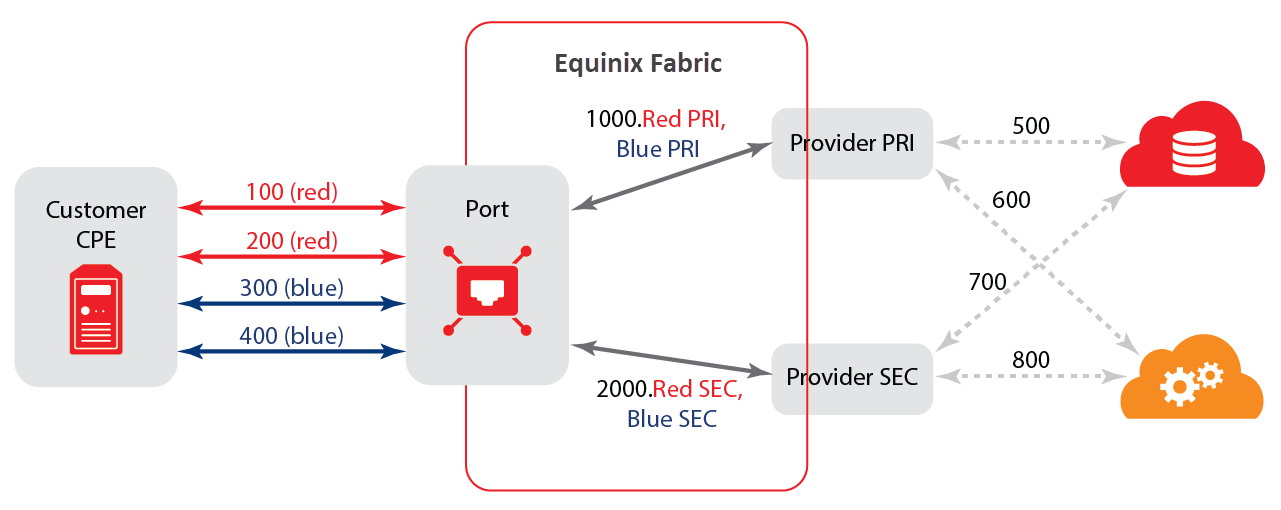
Ports associated with a service profile must use either the Dot1q or QinQ encapsulation type. You can’t combine ports with different encapsulation types on the same service profile.
Equinix Fabric offers the optional Enhanced Dot1q to QinQ Translation Support to assist the buyers to gather information from the provider in advance, and enter it into Equinix Fabric when creating a connection. This service allows a provider to name the services that a buyer will connect with. When the buyer creates a connection, the system will present them with these more familiar names in lieu of the S-Tag matching exercise. For example, a service provider might define Acme Cloud Storage and Acme Cloud Compute and Acme Cloud CRM as named services.
It is important that as a service provider, you have clear instructions about the order of events to perform certain actions to their customers. Equinix can't customize guidance for every provider with a discrete, private interconnection offer.
Review and Approve Connections
You can review and approve connection requests:
- manually through the portal or automatically, using Equinix Fabric API, or
- with prior arrangement with Equinix Fabric development by having Equinix Fabric integrate into your provisioning systems
In any case, the primary items that must be determined per connection request include:
- a valid authentication ID of the user who made request
- the local port where the users connection should be terminated, depending on your preference, fill factor, capacity management decisions, and other factors at your discretion
- the VLAN connection that should be mapped on your port
Once the approval has been received, the entire work-flow occurs within seconds and the user is capable of sending traffic to your service within minutes.
Equinix Fabric can't begin provisioning and orchestration of the connection and can't consume any of the physical or logical resources until an approval.