Crear una suscripción
Una vez que haya creado una secuencia, cree una suscripción para enviar sus métricas y datos de eventos a su recopilador de datos.
Recopiladores de datos compatibles:
| Recopilador de datos | Eventos | Métricas |
|---|---|---|
| Datadog | Admitido | Admitido |
| Dynatrace | Admitido | Admitido |
| Pub/Sub de Google | Admitido | Admitido |
| Webhook de Grafana | Admitido | Admitido |
| Equipos de Microsoft | Admitido | Admitido |
| PagerDuty | Admitido | No se admite |
| Servicio Ahora | Admitido | No se admite |
| Webhook de Slack | Admitido | Admitido |
| Splunk HEC | Admitido | Admitido |
| Webhooks genéricos | Admitido | Admitido |
Formatos de datos
Los eventos y las métricas de Equinix utilizan el formato de especificación de CloudEvents o el formato de especificación de Opentelemetría para todos los datos. Todos nuestros esquemas de datos de eventos, esquemas de datos de métricas y tipos de datos se publican en el /equinix/equinix-cloudeventsrepositorio de GitHub.
Ejemplos:
- CloudEvent
- CloudEvents Metric
- OpenTelemetry Log
- OpenTelemetry Metric
---
specversion: '1.0'
source: https://api.equinix.com/fabric/v4/cloudevents
id: 6c573287-9914-4202-8b6d-2d15e7da04b8
type: equinix.fabric.metric
subject: /fabric/v4/ports/956a86fb-d03d-436c-8d5d-30d1f51f7688
time: '2024-07-01T20:12:21.306Z'
severitynumber: 9
severitytext: INFO
equinixproject: 123
dataschema: https://github.com/Fabric/.../ApiConfigEventData.json
datacontenttype: application/json
data:
  message: New metrics collected
  resource:
    href: https://api.equinix.com/fabric/v4/ports/956a86fb-d03d-436c-8d5d-30d1f51f7688
    uuid: 956a86fb-d03d-436c-8d5d-30d1f51f7688
    name: my-test-port
    description: port description
  metrics:
  - type: GAUGE
    name: equinix.fabric.port.bandwidth_rx.usage
    description: Port inbound bandwidth utilization
    unit: bit/s
    datapoints:
    - endDateTime: '2024-07-01T20:12:21.000Z'
      value: 440023
  - type: SUM
    name: equinix.fabric.port.packets_erred_tx.count
    description: Port error packets
    interval: PT5M
    unit: packet
    datapoints:
    - endDateTime: '2024-07-01T20:12:21.000Z'
      value: 10
{
  "specversion": "1.0",
  "source": "https://api.equinix.com/fabric/v4/cloudevents",
  "id": "16c7e20a-d147-40c4-81ad-f60d25548aad",
  "time": "2026-06-24T20:20:59.000Z",
  "type": "equinix.fabric.metric",
  "subject": "/fabric/v4/ports/956a86fb-d03d-436c-8d5d-30d1f51f7688",
  "dataschema": "https://equinix.github.io/equinix-cloudevents/jsonschema/equinix/fabric/v1/MetricEvent.json",
  "datacontenttype": "application/json",
  "severitynumber": "9",
  "severitytext": "INFO",
  "equinixproject": "123",
  "data": {
    "message": "Metrics collected",
    "resource": {
      "href": "https://api.equinix.com/fabric/v4/ports/956a86fb-d03d-436c-8d5d-30d1f51f7688",
      "uuid": "956a86fb-d03d-436c-8d5d-30d1f51f7688",
      "type": "XF_PORT",
      "state": "PROVISIONED"
    },
    "metrics": [
      {
        "type": "GAUGE",
        "name": "equinix.fabric.port.bandwidth_rx.usage",
        "unit": "bit/s",
        "datapoints": [
          {
            "endDateTime": "2026-06-24T20:20:59.000Z",
            "value": 179
          }
        ]
      },
      {
        "type": "GAUGE",
        "name": "equinix.fabric.port.bandwidth_tx.usage",
        "unit": "bit/s",
        "datapoints": [
          {
            "endDateTime": "2026-06-24T20:20:59.000Z",
            "value": 1711
          }
        ]
      }
    ]
  }
}
---
resourceLogs:
- resource:
    attributes:
    - key: service.name
      value:
        stringValue: Equinix
    - key: equinix.event.specversion
      value:
        stringValue: '1.0'
    - key: equinix.event.source
      value:
        stringValue: https://api.equinix.com/fabric/v4/cloudevents
    - key: equinix.event.subject
      value:
        stringValue: /fabric/v4/ports/956a86fb-d03d-436c-8d5d-30d1f51f7688
    - key: equinix.event.equinixproject
      value:
        stringValue: 123
  scopeLogs:
  - scope:
    logRecords:
    - timeUnixNano: '1719889941306000000'
      severityNumber: 9
      severityText: Information
      body:
        stringValue: '{"message":"Virtual port status changed to Up","resource":{"href":"https://api.equinix.com/fabric/v4/ports/956a86fb-d03d-436c-8d5d-30d1f51f7688","uuid":"956a86fb-d03d-436c-8d5d-30d1f51f7688","name":"my-test-port","description":"port description"}}'
      attributes:
      - key: equinix.event.id
        value:
          stringValue: 6c573287-9914-4202-8b6d-2d15e7da04b8
      - key: equinix.event.type
        value:
          stringValue: equinix.fabric.port.status.up
---
resourceMetrics:
- resource:
    attributes:
    - key: service.name
      value:
        stringValue: Equinix
    - key: equinix.event.specversion
      value:
        stringValue: '1.0'
    - key: equinix.event.source
      value:
        stringValue: https://api.equinix.com/fabric/v4/cloudevents
    - key: equinix.event.subject
      value:
        stringValue: /fabric/v4/ports/956a86fb-d03d-436c-8d5d-30d1f51f7688
    - key: equinix.event.equinixproject
      value:
        stringValue: 123
  scopeMetrics:
  - scope:
    metrics:
    - name: equinix.fabric.port.bandwidth_rx.usage
      description: Port inbound bandwidth utilization
      unit: 'bit/s'
      gauge:
        dataPoints:
        - attributes:
          - key: service.name
            value:
              stringValue: Equinix
          - key: equinix.event.source
            value:
              stringValue: https://api.equinix.com/fabric/v4/cloudevents
          - key: equinix.event.subject
            value:
              stringValue: /fabric/v4/ports/956a86fb-d03d-436c-8d5d-30d1f51f7688
          - key: equinix.event.equinixproject
            value:
              stringValue: 123
          - key: equinix.event.resource.name
            value:
              stringValue: 'my-port-name'
          timeUnixNano: '1719889941306000000'
          asInt: 566
    - name: equinix.fabric.port.packets_erred_tx.count
      description: Port error packets
      unit: packet
      sum:
        aggregationTemporality: 2 # required for sum https://github.com/open-telemetry/opentelemetry-proto/blob/v0.9.0/opentelemetry/proto/metrics/v1/metrics.proto#L230
        dataPoints:
        - attributes:
          - key: service.name
            value:
              stringValue: Equinix
          - key: equinix.event.source
            value:
              stringValue: https://api.equinix.com/fabric/v4/cloudevents
          - key: equinix.event.subject
            value:
              stringValue: /fabric/v4/ports/956a86fb-d03d-436c-8d5d-30d1f51f7688
          - key: equinix.event.equinixproject
            value:
              stringValue: 123
          - key: equinix.event.resource.name
            value:
              stringValue: 'my-port-name'
          startTimeUnixNano: '1719889641306000000' # optional
          timeUnixNano: '1719889941306000000'
          asInt: 10
Cualquier variación de estos formatos para recopiladores de datos específicos se incluye a continuación.
Requisitos previos
- Para crear suscripciones, debe tener el
Fabric Stream Subscription Managerrol (CREACIÓN Y LECTURA DE PERMISOS STRAM_SUBSCRIPTION). Póngase en contacto con el administrador de su empresa o con el administrador de IAM para gestionar el acceso y los roles.
- Portal
- API
El portal permite crear y gestionar suscripciones a Splunk, Datadog, Microsoft Teams y PagerDuty.
-
Inicie sesión en el portal del cliente > Panel de control de Fabric .
-
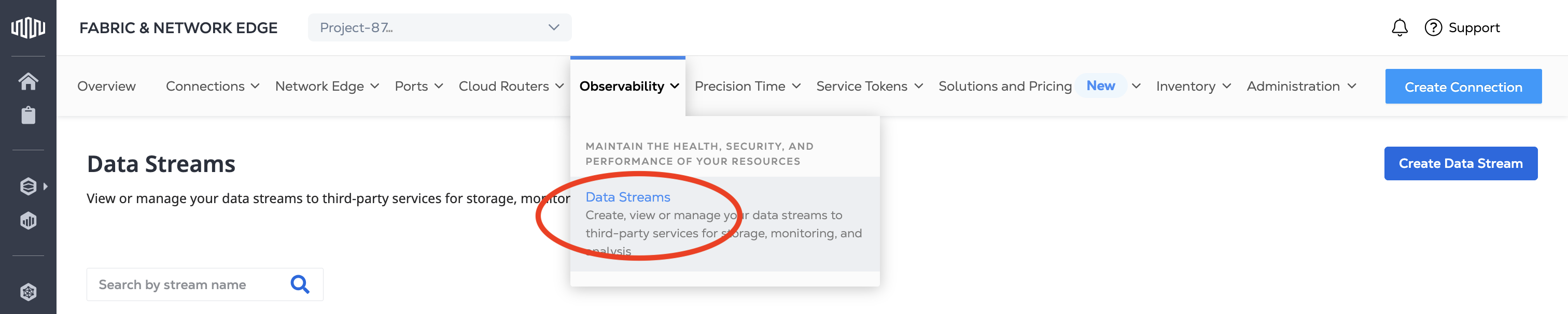
En el menú Observabilidad, seleccione Flujos de datos .
-
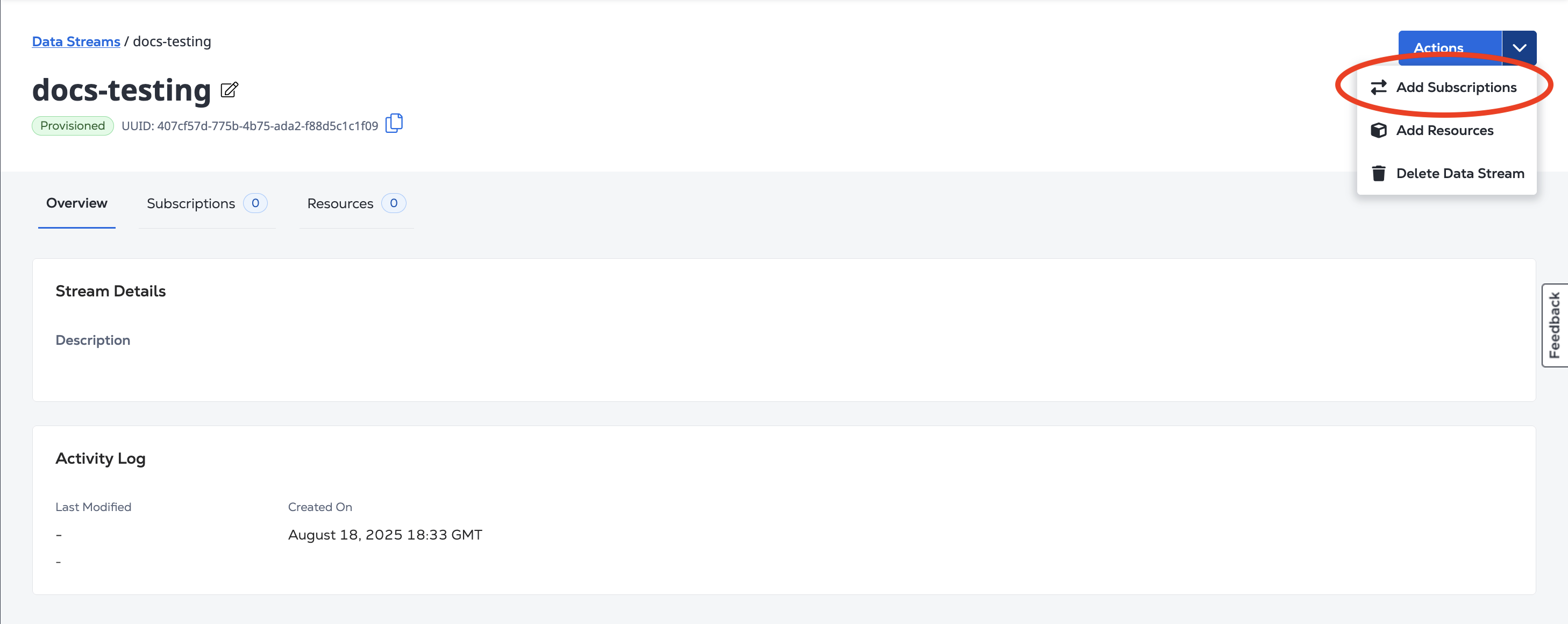
En el menú desplegable Acciones, seleccione Añadir suscripciones .
- Autenticar. Envíe sus credenciales de usuario, ID de cliente y secreto de cliente para la autenticación OAuth2. Consulte Autenticación de API para obtener más información sobre cómo autenticar sus solicitudes en Equinix API.
Los valores URI/host de la API de suscripción sólo admiten HTTPS y no admiten certificados autofirmados.
Datadog
Una suscripción de Datadog requiere su API de Datadog y claves de aplicación al crear su suscripción.
Para obtener una guía de configuración para integrarse con Datadog, consulte Cómo configurar Datadog en la comunidad Equinix.
- Portal
- API
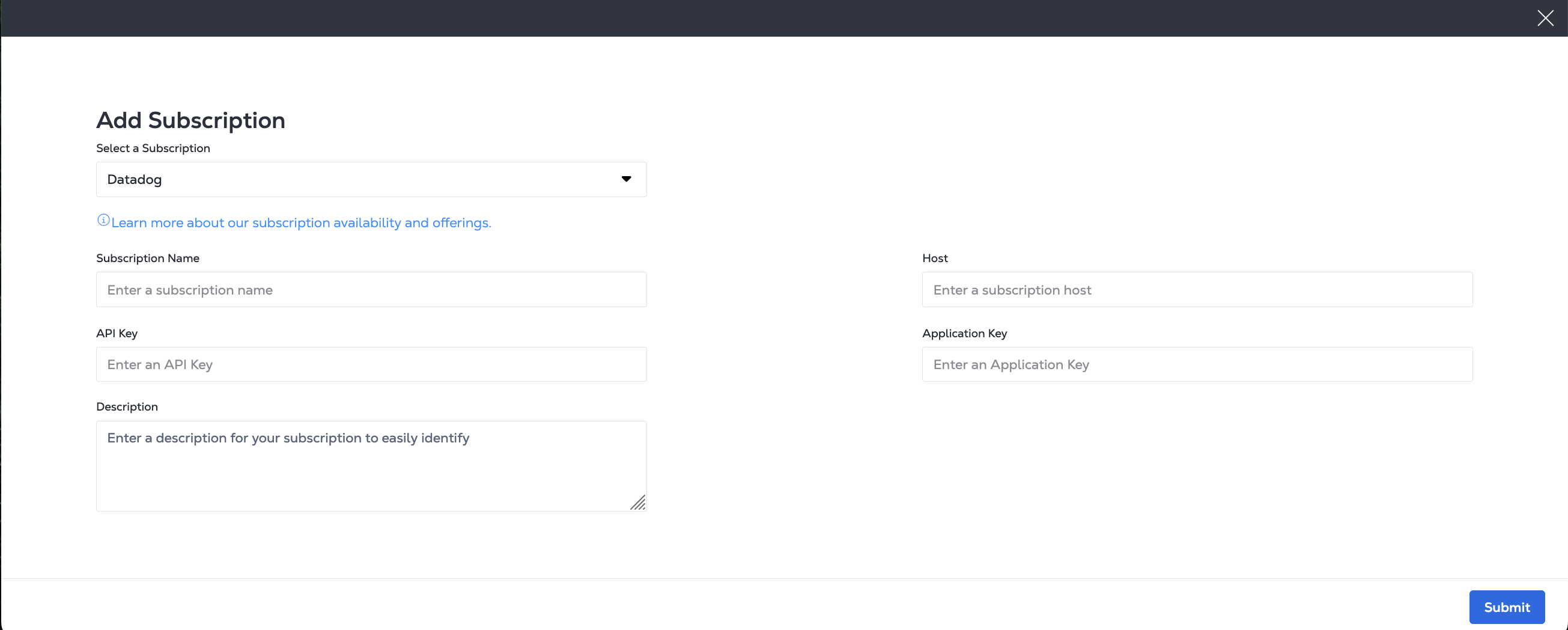
En la página Añadir suscripción, introduzca la información de su Datadog, que incluye:
- a Nombre de la suscripción
- su URL de host de Datadog
- su clave API de Datadog
- su clave de aplicación Datadog
- y proporcione una descripción (opcional)
Para crear una suscripción, envíe una POST solicitud al /fabric/v4/streams/<streamId>/subscriptionspunto final. Especifique el ID de flujo en la stream ruta de su solicitud.
En el sink objeto del cuerpo de la solicitud:
- Especifique el
typeASDATADOG. - Utilice la tabla de referencia del sitio de Datadog para encontrar el parámetro del sitio para el
sink.hostparámetro. - Proporcione su clave de API de datos y su clave de aplicación
Ejemplo de solicitud cURL:
curl -X 'POST' 'https://api.equinix.com/fabric/v4/streams/<streamId>/subscriptions' \
-H 'Content-Type: application/json' \
-H 'Authorization: Bearer <Bearer Token>' \
-d '{
  "type": "STREAM_SUBSCRIPTION",
  "name": "<datadog_subscription_name>",
  "description": "<datadog_subscription_desc>",
  "sink": {
    "host": "https://<datadog_site_parameter>",
    "type": "DATADOG",
    "credential": {
      "type": "API_KEY",
      "apiKey": "<datadog_api_key>"
    },
    "settings": {
      "applicationKey": "<datadog_application_key>"
    }
  }
}'
Ejemplos de datos
- Event
- Metric
---
date_happened: 1719864741 # in seconds
source_type_name: Equinix
aggregation_key: <aggregation_key>
title: 'Virtual port status changed to Up'
status: info # INFO->info, WARN -> warn, ERROR->error, CRITICAL->warn, FATAL->error, default: info
text: "{\"cloudevent\":{\"specversion\":\"1.0\",\"source\":\"https://api.equinix.com/fabric/v4/cloudevents\",\"id\":\"6c573287-9914-4202-8b6d-2d15e7da04b8\",\"type\":\"equinix.fabric.port.status.up\",\"subject\":\"/fabric/v4/ports/956a86fb-d03d-436c-8d5d-30d1f51f7688\",\"time\":\"2024-07-01T20:12:21.306Z\",\"severitynumber\":9,\"severitytext\":\"INFO\",\"equinixalert\":\"clear/<aggregation_key>\",\"equinixproject\":\"123\",\"data\":{\"message\":\"Virtual port status changed to Up\",\"resource\":{}}}}"
---
series:
- type: 3 # 0(unspecified), 1(count), 2(rate), 3(gauge)
  metric: equinix.fabric.port.bandwidth_rx.usage
  resources:
  - type: subject
    name: /fabric/v4/ports/956a86fb-d03d-436c-8d5d-30d1f51f7688
  - type: equinixproject
    name: 123
  unit: bit/s
  points:
  - timestamp: 1719889941
    value: 440023
- type: 1
  metric: equinix.fabric.port.packets_erred_tx.count
  resources:
  - type: subject
    name: /fabric/v4/ports/956a86fb-d03d-436c-8d5d-30d1f51f7688
  - type: equinixproject
    name: 123
  unit: packet
interval: 300 # in seconds
  points:
  - timestamp: 1719889941
    value: 10
Dynatrace
Para crear una suscripción de Dynatrace, cree un índice de eventos para recibir eventos, un índice de métricas para recibir métricas o ambas, a continuación, cree un recopilador de eventos HTTP.
- Portal
- API
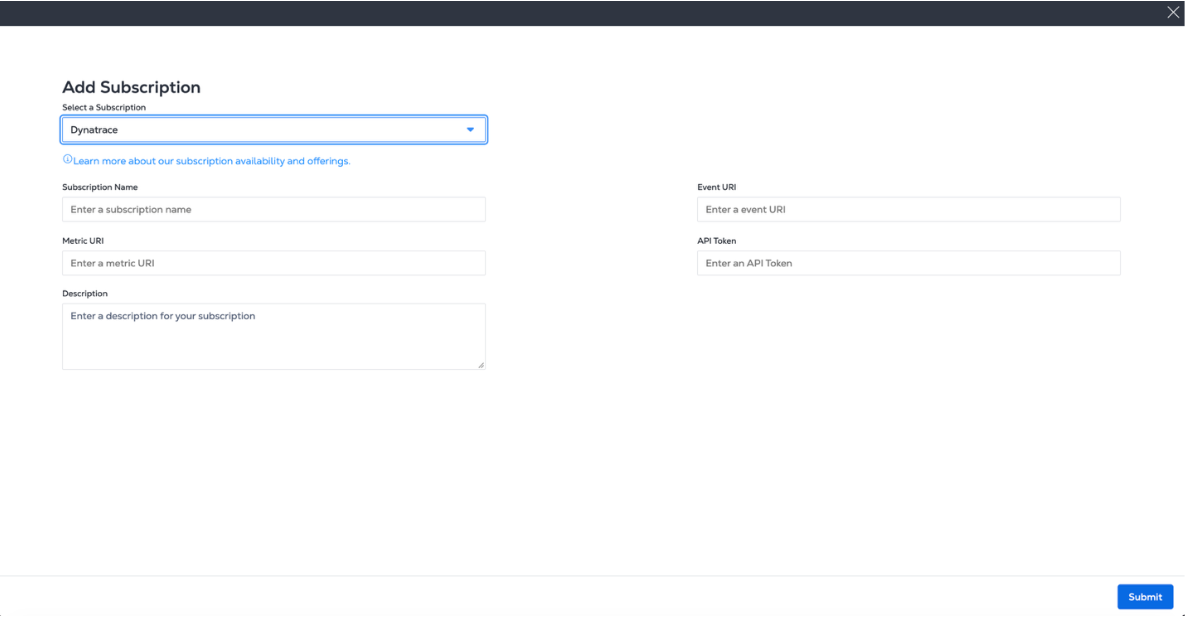
En la página Añadir suscripción, introduzca la información de su Dynatrace, que incluye:
- a Nombre de la suscripción
- El URI del recopilador de eventos HTTP de Dynatrace
- Su token de acceso a Dynatrace
- Su índice de eventos de Dynatrace (obligatorio)
- Su índice de métricas de Dynatrace, si planea incorporar métricas en Splunk
- y proporcione una descripción (opcional)
Para crear una suscripción, envíe una POST solicitud al /fabric/v4/streams/<streamId>/subscriptionspunto final. Especifique el ID de flujo en la stream ruta de su solicitud.
En el sink objeto del cuerpo de la solicitud:
- Especifique el
typeASDYNATRACE. - Proporcione el URI del recopilador de eventos HTTP de Dynatrace.
- Proporcione su índice de eventos de Dynatrace (obligatorio) y su índice de métricas de Dynatrace (opcional).
- Proporcione su token de acceso a Dynatrace.
Ejemplo de solicitud cURL:
curl -X 'POST' 'https://api.equinix.com/fabric/v4/streams/<streamId>/subscriptions' \
-H 'Content-Type: application/json' \
-H 'Authorization: Bearer <Bearer Token>' \
-d '{
"type": "STREAM_SUBSCRIPTION",
"name": "dynatrace-subscription",
"description": "subscription-1",
"enabled": true,
"metricSelector": {
    "include": [
        "equinix.fabric.connection.*"
    ]
},
"sink": {
    "type": "DYNATRACE",
    "credential": {
        "type": "API_TOKEN",
        "apiToken": "<dynatrace-api-token>"
    },
    "settings": {
        "eventUri": "https://<dynatrace-host>.live.dynatrace.com/platform/ingest/v1/events",
        "metricUri": "https://<dynatrace-host>.live.dynatrace.com/api/v2/metrics/ingest"
    }
}
}'
Google PubSub
Una suscripción de Google Pub/Sub requiere lo siguiente:
- Crear un tema.
- Conceder permisos de IAM a una cuenta de servicio para PUB/Sub.
- Proporcione el URI de su tema y las credenciales de su cuenta de servicio al crear su suscripción.
Para obtener una guía de configuración de Google Pub/Sub, consulta Cómo configurar Google Pub/Sub en la comunidad de Equinix.
- Portal
- API
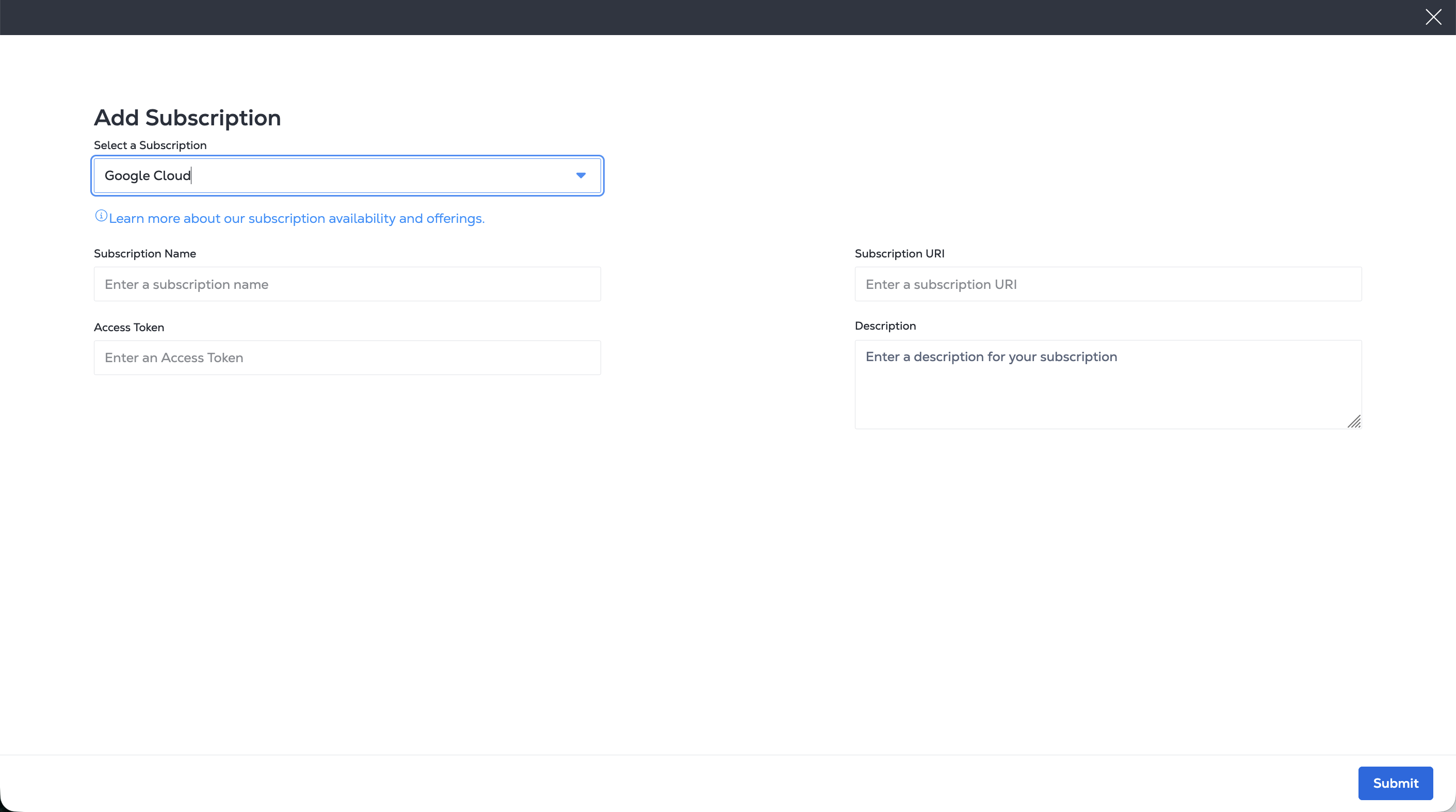
En la página Añadir suscripción, introduzca la información de Google Cloud PubSub, que incluye:
- Un nombre de suscripción
- El token de acceso PubSub de Google Cloud
- El URI de la suscripción de Google Cloud PubSub
- Y proporcione una descripción (opcional)
Para crear una suscripción, envíe una POST solicitud al /fabric/v4/streams/<streamId>/subscriptionspunto final. Especifique el ID de flujo en la stream ruta de su solicitud.
En el sink objeto del cuerpo de la solicitud:
- Especifique el
typeASGOOGLE_PUBSUB. - Proporcione su token de acceso a PubSub de Google Cloud y el URI de la suscripción de PubSub.
Ejemplo de solicitud cURL:
curl -X POST 'https://api.equinix.com/fabric/v4/streams/<streamId>/subscriptions' \
-H 'Content-Type: application/json' \
-H 'Authorization: Bearer <Bearer Token>' \
-d '{
  "type": "STREAM_SUBSCRIPTION",
  "name": "<gcp_pubsub_subscription_name>",
  "description": "<gcp_pubsub_subscription_desc>",
  "sink": {
    "uri": "https://pubsub.googleapis.com/v1/projects/<gcp_project_name>/topics/<gcp_topic_name>:publish",
    "type": "GOOGLE_PUBSUB",
    "credential": {
      "type": "ACCESS_TOKEN",
      "accessToken": "<encoded_base64_service_account_json>"
    }
  }
}'
Grafana Webhook
Para crear una suscripción a Grafana, cree y configure Grafana para webhooks entrantes . Proporcione la URL y la clave API de su webhook de Grafana al crear su suscripción.
Para obtener una guía de configuración de Grafana, consulte Cómo configurar el webhook de Grafana en la comunidad de Equinix.
- Portal
- API
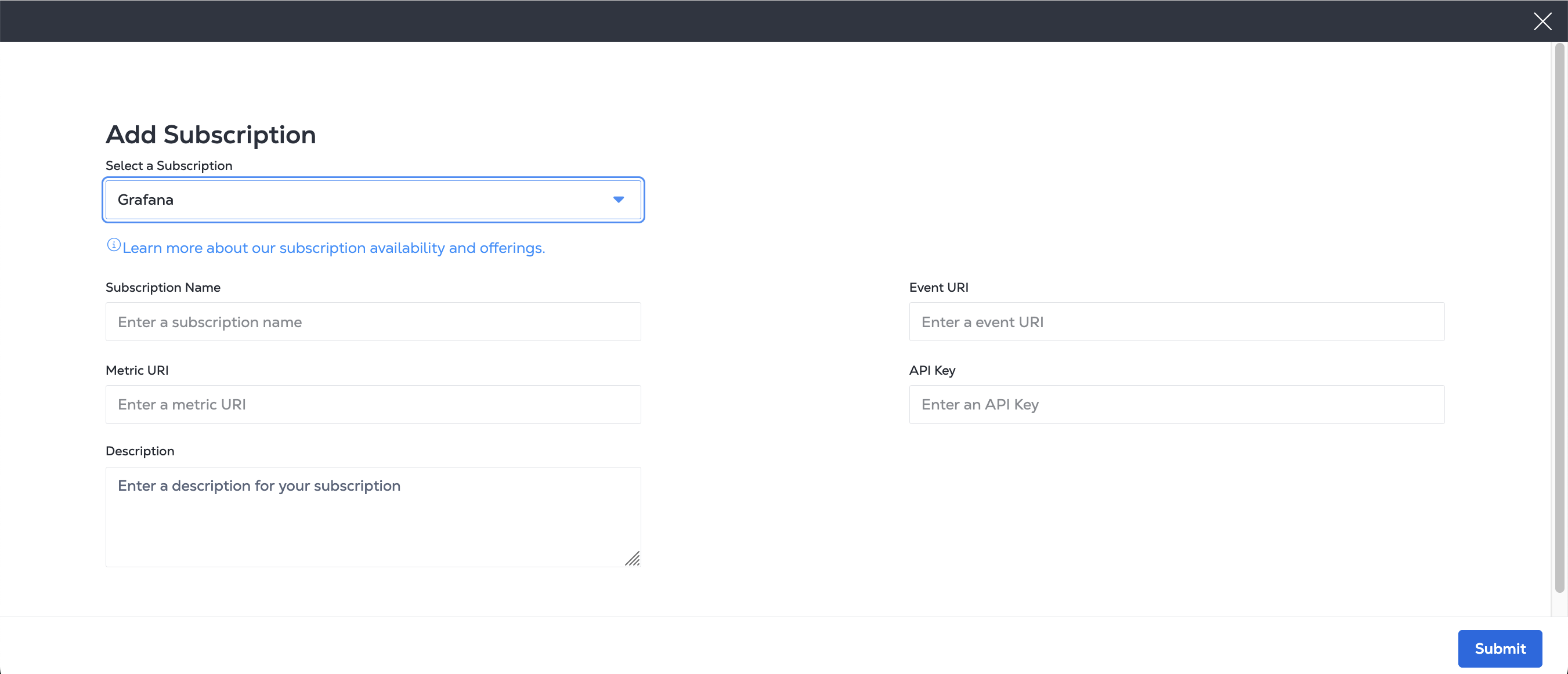
En la página Añadir suscripción, introduzca la información de Grafana, que incluye:
- Un nombre de suscripción.
- El URI de métricas de Grafana.
- El URI de eventos de Grafana.
- Su clave API de Grafana.
- Una descripción opcional.
Para crear una suscripción, envíe una POST solicitud al /fabric/v4/streams/<streamId>/subscriptionspunto final. Especifique el ID de flujo en la stream ruta de su solicitud.
En el sink objeto del cuerpo de la solicitud:
- Especifique el
typeASWEBHOOK. - Proporcione su URI de métricas de Grafana, URI de eventos o ambos.
- Proporcione su clave de Grafana API.
Ejemplo de solicitud cURL:
curl -X POST 'https://api.equinix.com/fabric/v4/streams/<streamId>/subscriptions' \
-H 'Content-Type: application/json' \
-H 'Authorization: Bearer <Bearer Token>' \
-d '{
  "type": "STREAM_SUBSCRIPTION",
  "name": "<webhook_subscription_name>",
  "description": "<webhook_subscription_desc>",
  "enabled": true,
  "sink": {
    "type": "WEBHOOK",
    "settings": {
      "metricUri": "https://<grafana_oltp_endpoint>/otlp/v1/metrics",
      "format": "OPENTELEMETRY"
    },
    "credential": {
      "type": "API_KEY",
      "apiKey": "<grafana_instance_id>:<grafana_api_key>"
    }
  }
}'
Equipos Microsoft
Para crear una suscripción de Microsoft Teams, cree y configure un webhook para publicar mensajes cuando se reciba una solicitud de webhook. Una vez configurado el webhook, proporcione la URL de su HTTP POST al crear su suscripción.
Para obtener una guía de configuración para Microsoft Teams, consulte Cómo configurar Microsoft Teams en la comunidad de Equinix.
- Portal
- API
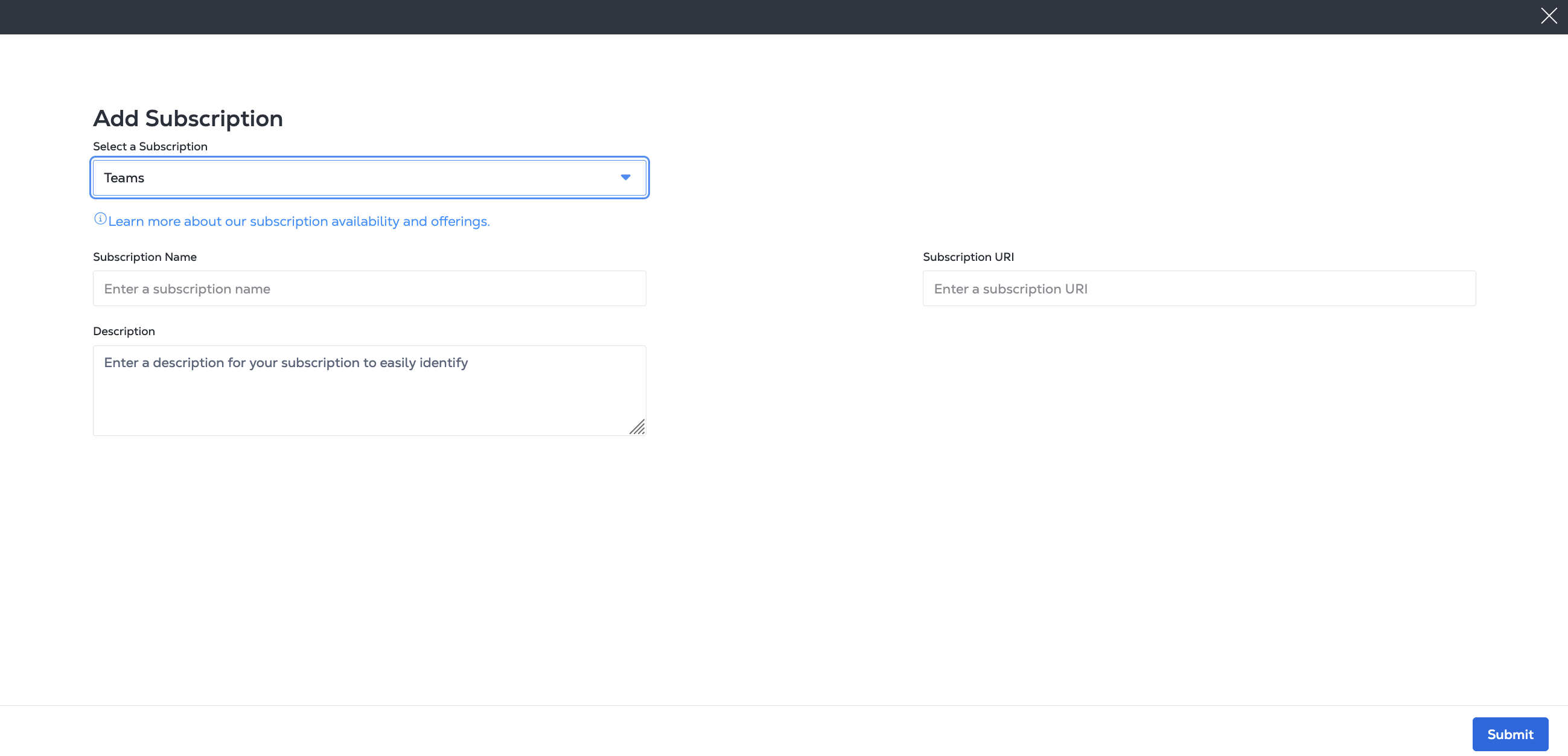
En la página Añadir suscripción, introduzca la información de Microsoft Teams, que incluye:
- a Nombre de la suscripción
- El URI del Webhook de su flujo de trabajo de Microsoft
- y proporcione una descripción (opcional)
Para crear una suscripción, envíe una POST solicitud al /fabric/v4/streams/<streamId>/subscriptionspunto final. Especifique el ID de flujo en la stream ruta de su solicitud.
En el sink objeto del cuerpo de la solicitud:
- Especifique el
typeASTEAMS. - Proporcione el URI del Webhook de su flujo de trabajo de Microsoft.
Ejemplo de solicitud cURL:
curl -X 'POST' 'https://api.equinix.com/fabric/v4/streams/<streamId>/subscriptions' \
-H 'Content-Type: application/json' \
-H 'Authorization: Bearer <Bearer Token>' \
-d '{
  "type": "STREAM_SUBSCRIPTION",
  "name": "<ms_teams_subscription>",
  "description": "<ms_teams_subscription_desc>",
  "sink": {
    "uri": "<teams_webhook_uri>",
    "type": "TEAMS"
  }
}'
PagerDuty
Para una suscripción de PagerDuty, cree un servicio y una integración deAPI de eventos 2 para gestionar sus eventos. Proporcione su URI de PagerDuty y la clave de integración al crear su suscripción.
Para obtener una guía de configuración de PagerDuty, consulte Cómo configurar PagerDuty en la Comunidad Equinix.
- Portal
- API
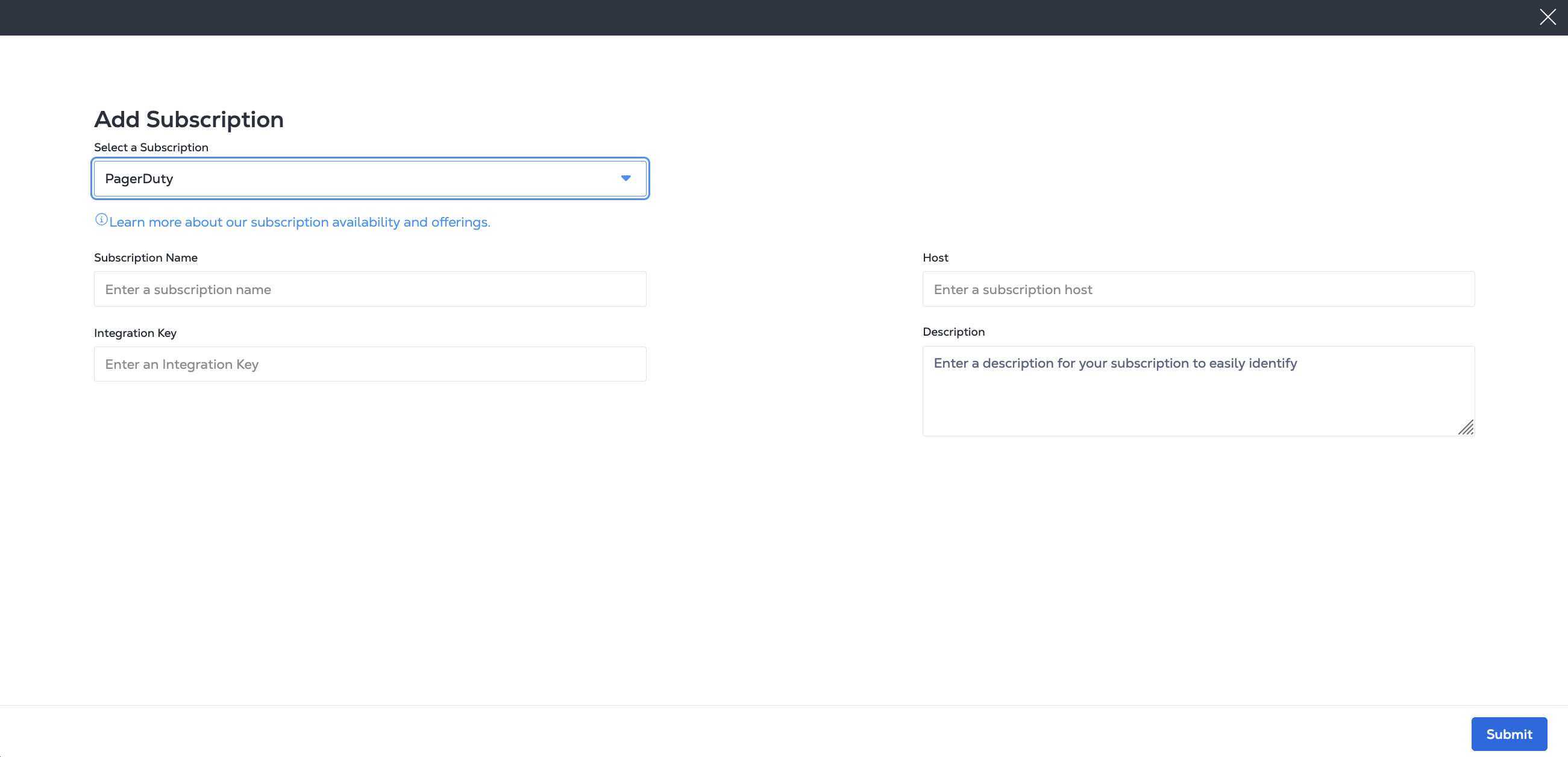
En la página Añadir suscripción, introduzca la información de su PagerDuty, que incluye:
- a Nombre de la suscripción
- Url de su host PagerDuty
- su clave de integración con PagerDuty
- y proporcione una descripción (opcional)
Para crear una suscripción, envíe una POST solicitud al /fabric/v4/streams/<streamId>/subscriptionspunto final. Especifique el ID de flujo en la stream ruta de su solicitud.
En el sink objeto del cuerpo de la solicitud:
- Especifique el
typeASPAGERDUTY. - Proporcione la URL del host de PagerDuty y la clave de integración.
Ejemplo de solicitud cURL:
curl -X 'POST' 'https://api.equinix.com/fabric/v4/streams/<streamId>/subscriptions' \
-H 'Content-Type: application/json' \
-H 'Authorization: Bearer <Bearer Token>' \
-d '{
  "type": "STREAM_SUBSCRIPTION",
  "name": "<pagerduty_subscription_name>",
  "description": "<pagerduty_subscription_desc>",
  "sink": {
    "host": "https://events.pagerduty.com",
    "type": "PAGERDUTY",
    "credential": {
      "type": "INTEGRATION_KEY",
      "integrationKey": "<pagerduty_integration_key>"
    }
  }
}'
Ejemplo de datos de PagerDuty
- Event
---
routing_key: <routing_key>
dedup_key: <dedup_key>
event_action: trigger # or resolve
payload:
  source: Equinix
  timestamp: '2024-07-01T20:12:21.306Z'
  severity: critical
  summary: Virtual port status changed to Down
  custom_details:
    equinixsource: https://api.equinix.com/fabric/v4/cloudevents
    specversion: '1.0'
    id: <uuid>
    type: equinix.fabric.port.status.down
    subject: /fabric/v4/ports/<port_uuid>
    time: '2024-07-01T20:12:21.306Z'
    severitynumber: 21
    severitytext: FATAL # or INFO
    equinixalert: raise/<dedup_key>
    equinixproject: 123
ServiceNow
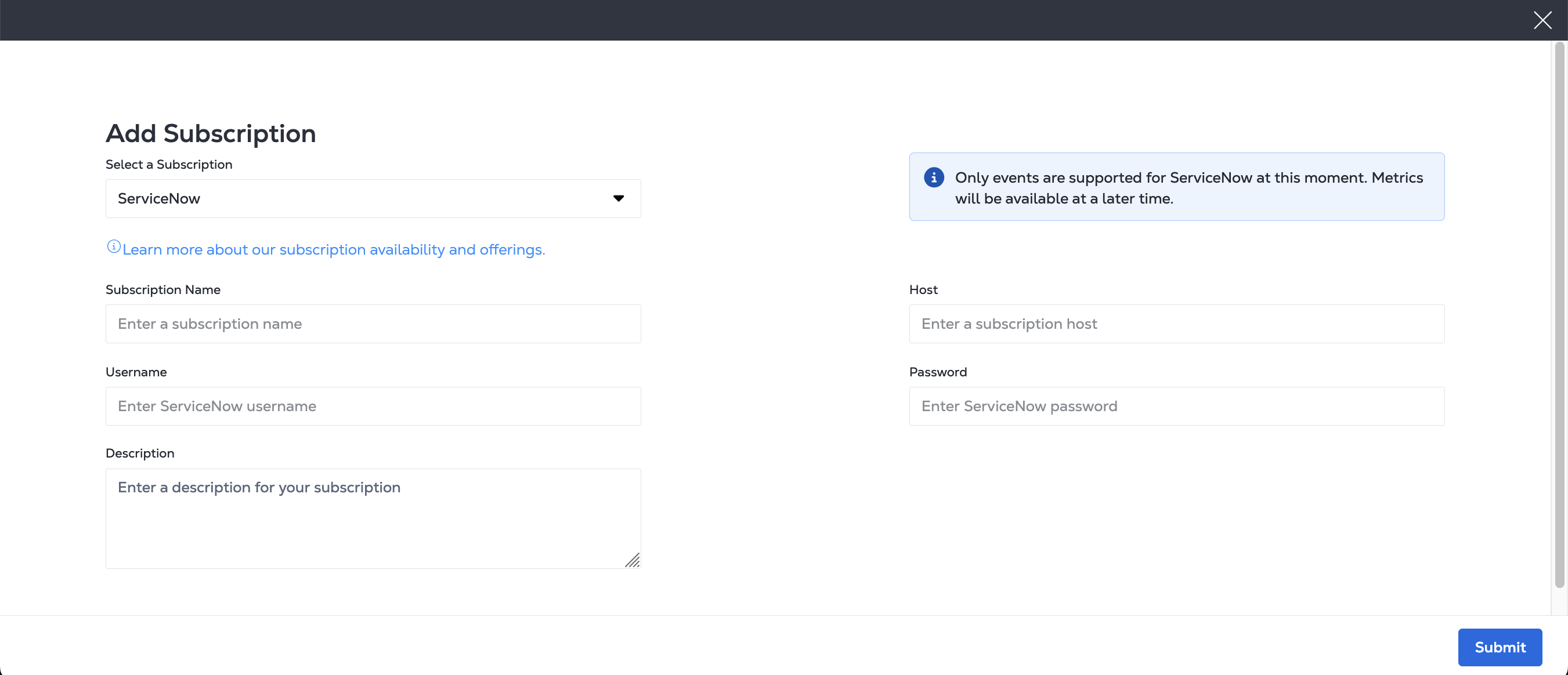
Una suscripción de ServiceNow requiere su nombre de usuario y contraseña de ServiceNow .
- Portal
- API
En la página Añadir suscripción, introduzca la información de ServiceNow, que incluye:
- Un nombre de suscripción.
- La URL del host de ServiceNow.
- Su nombre de usuario de ServiceNow.
- Su contraseña de ServiceNow.
- Una descripción opcional.
Para crear una suscripción de ServiceNow, envíe una POST solicitud al /fabric/v4/streams/<streamId>/subscriptionspunto final. Especifique el ID de flujo en la stream ruta de su solicitud.
En el sink objeto del cuerpo de la solicitud:
- Especifique el
typeASSERVICENOW. - Proporcione su url de host de ServiceNow, nombre de usuario y contraseña.
Ejemplo de solicitud cURL:
curl -X 'POST' 'https://api.equinix.com/fabric/v4/streams/<streamId>/subscriptions' \
-H 'Content-Type: application/json' \
-H 'Authorization: Bearer <Bearer Token>' \
-d '{
  "type": "STREAM_SUBSCRIPTION",
  "name": "<servicenow_subscription_name>",
  "description": "<servicenow_subscription_desc>",
  "sink": {
    "host": "https://<host>.service-now.com",
    "type": "SERVICENOW",
    "settings": {
      "source": "<source_name>"
    },
    "credential": {
      "type": "USERNAME_PASSWORD",
      "username": "<servicenow-username>",
      "password": "<servicenow-password>"
    }
  }
}'
Ejemplos de datos de ServiceNow
- Event
- Metric
---
source: Equinix
time_of_event: '2024-07-01T20:12:21.306Z'
description: Virtual port status changed to Down
severity: 1 # 1 for clear and 0 for clear
resolution_state: New # or Closing
message_key: NCAB543WC4lrLpET8nLX4Vd8
resource: fabric.port
node: /fabric/v4/ports/956a86fb-d03d-436c-8d5d-30d1f51f7688
type: equinix.fabric.port.status.down
additional_info: '{"cloudevent":{"specversion":"1.0","source":"https://api.equinix.com/fabric/v4/cloudevents","id":"6c573287-9914-4202-8b6d-2d15e7da04b8","type":"equinix.fabric.port.status.down","subject":"/fabric/v4/ports/956a86fb-d03d-436c-8d5d-30d1f51f7681","time":"2024-07-01T20:12:21.306Z","severitynumber":13,"severitytext":"CRITICAL","equinixalert":"raise/NCAB543WC4lrLpET8nLX4Vd8","equinixproject":"123","data":{"message":"Virtual port named \'Test-port\' status changed to Down","resource":{}}}}'
---
- timestamp: 1719889941306000. #mili sec
  source: Equinix
  resource_path: "/fabric/v4/ports/956a86fb-d03d-436c-8d5d-30d1f51f7681"
  metric_type: equinix.fabric.port.bandwidth_rx.utilization
  value: 70.5
  ci2metric_id:
    type: GAUGE
    subject: "/fabric/v4/ports/956a86fb-d03d-436c-8d5d-30d1f51f7681"
    equinixproject: 123
    unit: "%"
- timestamp: 1719889941306000 #mili sec
  source: Equinix
  resource_path: "/fabric/v4/ports/956a86fb-d03d-436c-8d5d-30d1f51f7681"
  metric_type: equinix.fabric.port.packets_erred_tx.count
  value: 70.5
  ci2metric_id:
    type: GAUGE
    interval: PT5M
    subject: "/fabric/v4/ports/956a86fb-d03d-436c-8d5d-30d1f51f7681"
    equinixproject: 123
    unit: "%"
Slack
Una suscripción de Slack requiere la URL única de tu webhook. Consulte Crear y configurar una aplicación de Slack para webhooks entrantes .
Para obtener una guía de configuración para integrarse con Slack, consulte Cómo configurar Slack en la comunidad de Equinix.
- Portal
- API
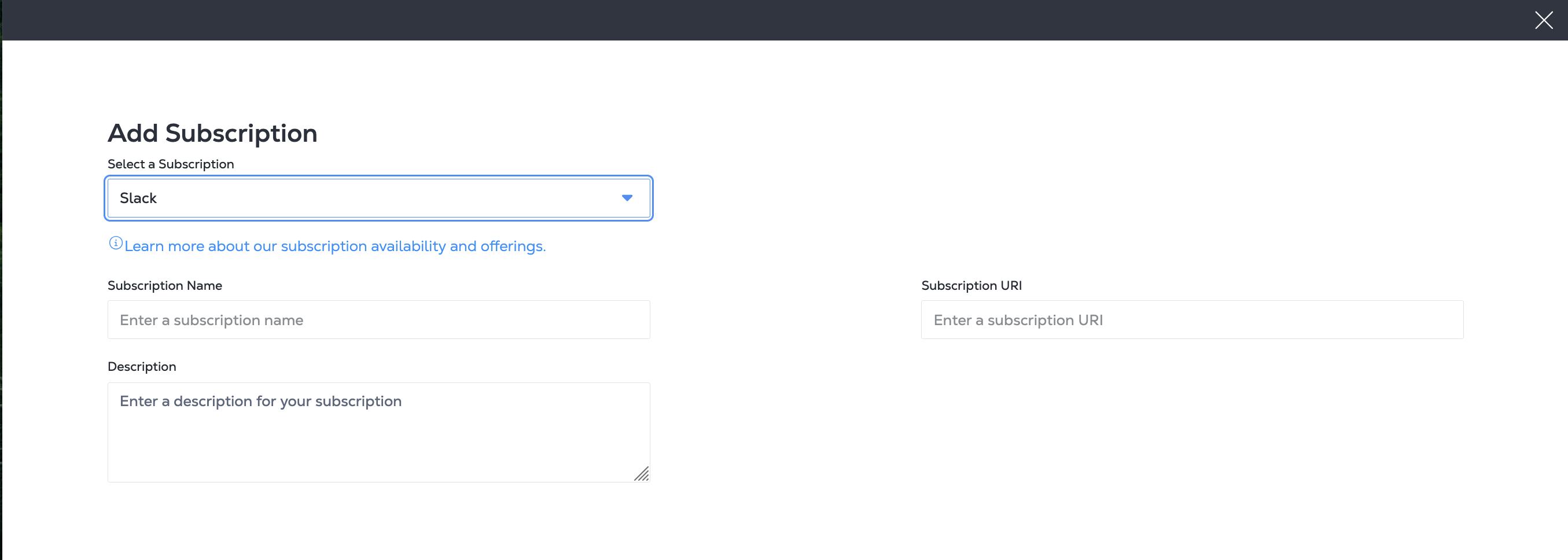
En la página Añadir suscripción, introduzca la información de Slack, que incluye:
- Nombre de la suscripción
- URI de suscripción
- Descripción (opcional)
Para crear una suscripción, envíe una POST solicitud al /fabric/v4/streams/<streamId>/subscriptionspunto final. Especifique el ID de flujo en la stream ruta de su solicitud.
En el sink objeto del cuerpo de la solicitud:
- Especifique el
typeASSLACK. - Proporcione el URI de la suscripción de Slack.
Ejemplo de solicitud cURL:
curl -X 'POST' 'https://api.equinix.com/fabric/v4/streams/<streamId>/subscriptions' \
-H 'Content-Type: application/json' \
-H 'Authorization: Bearer <Bearer Token>' \
-d '{
  "type": "STREAM_SUBSCRIPTION",
  "name": "<slack_subscription_name>",
  "description": "<slack_subscription_desc>",
  "sink": {
    "uri": "<slack_webhook_uri>",
    "type": "SLACK"
  }
}'
Splunk
Para crear una suscripción de Splunk, cree un índice de eventos para recibir eventos, un índice de métricas para recibir métricas o ambas y, a continuación, cree un recopilador de eventos HTTP. Proporcione su URI del recopilador de eventos HTTP, su token del recopilador de eventos HTTP y los nombres de sus índices al crear su suscripción.
Para obtener una guía de configuración para integrarse con Splunk, consulte Cómo configurar Splunk en la comunidad Equinix.
- Portal
- API
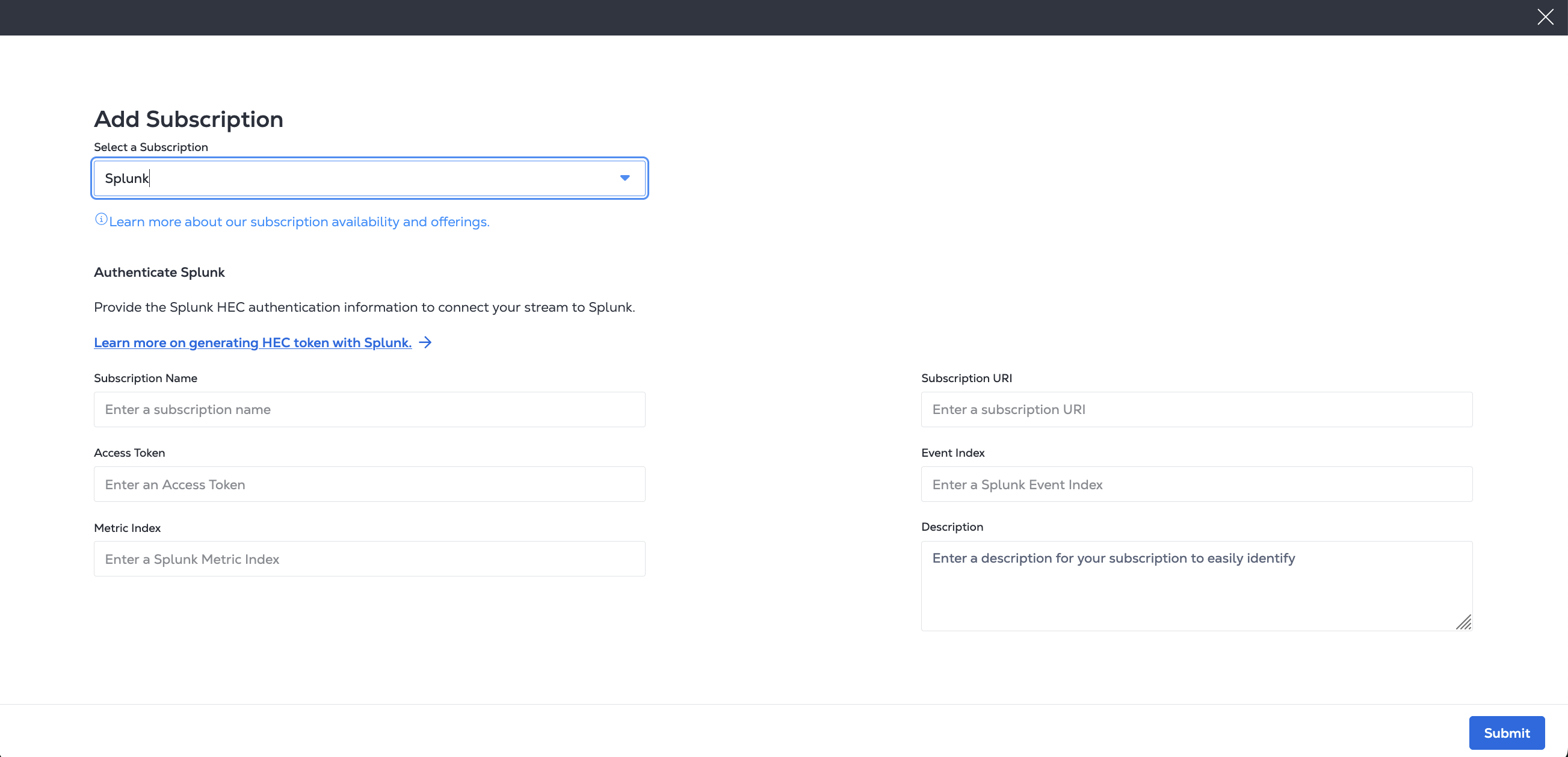
En la página Añadir suscripción, introduzca la información de Splunk, que incluye:
- a Nombre de la suscripción
- su URI del recolector de eventos HTTP de Splunk
- su token de acceso a Splunk
- su índice de eventos Splunk (obligatorio)
- su índice de métricas Splunk, si planea ingestar métricas en Splunk
- y proporcione una descripción (opcional)
Para crear una suscripción, envíe una POST solicitud al /fabric/v4/streams/<streamId>/subscriptionspunto final. Especifique el ID de flujo en la stream ruta de su solicitud.
En el sink objeto del cuerpo de la solicitud:
- Especifique el
typeASSPLUNK_HEC. - Proporcione el URI del recopilador de eventos HTTP de Splunk.
- Proporcione su índice de eventos de Splunk (obligatorio) y su índice de métricas de Splunk (opcional).
- Proporcione su token de acceso a Splunk.
Ejemplo de solicitud cURL:
curl -X 'POST' 'https://api.equinix.com/fabric/v4/streams/<streamId>/subscriptions' \
-H 'Content-Type: application/json' \
-H 'Authorization: Bearer <Bearer Token>' \
-d '{
  "type": "STREAM_SUBSCRIPTION",
  "name": "<splunk_subscription_name>",
  "description": "<splunk_subscription_desc>",
  "sink": {
    "uri": "https://http-inputs-<host>.splunkcloud.com:<port>/services/collector/event",
    "type": "SPLUNK_HEC",
    "settings": {
      "eventIndex": "<name_of_eventIndex>",
      "metricIndex": "<name_of_metricIndex>",
      "source": "<name_of_splunk_hec>"
    },
    "credential": {
      "type": "ACCESS_TOKEN",
      "accessToken": "Splunk <Splunk AccessToken>"
    }
  }
}'
Ejemplos de datos de Splunk
- Event
- Metric
---
sourcetype: _json
index: test-event-index
source: equinix # optional
event:
  equinixsource: https://api.equinix.com/fabric/v4/cloudevents
  specversion: '1.0'
  id: 6c573287-9914-4202-8b6d-2d15e7da04b8
  type: equinix.fabric.port.status.up
  subject: /fabric/v4/ports/956a86fb-d03d-436c-8d5d-30d1f51f7688
  time: '2024-07-01T20:12:21.306Z'
  severitynumber: 9
  severitytext: INFO
  equinixalert: clear/NCAB543WC4lrLpET8nLX4Vd8
  equinixproject: 123
  data:
    message: Virtual port status changed to Up
    resource:
      href: https://api.equinix.com/fabric/v4/ports/956a86fb-d03d-436c-8d5d-30d1f51f7688
      uuid: 956a86fb-d03d-436c-8d5d-30d1f51f7688
      name: my-test-port
      description: port description
---
time: 1719889941.306
event: metric
index: test-index-metric
source: Equinix # Optional
fields:
  subject: /fabric/v4/ports/956a86fb-d03d-436c-8d5d-30d1f51f7688
  equinixproject: 123
  "metric_name:equinix.fabric.port.bandwidth_rx.usage": 440023
  "metric_name:equinix.fabric.port.packets_erred_tx.count": 10
Webhook genérico
Equinix admite la creación de una suscripción a cualquier servicio genérico de webhook para eventos y métricas en formato de especificación de CloudEvent o formato de especificación de OpenTelemetría .
Debe incluir un URI del evento o un URI métrico. Para transmitir eventos y métricas, debe proporcionar un URI del evento y un URI de métrica. Si proporciona solo uno de estos campos, solo se envía el tipo de datos correspondiente (eventos o métricas) a la plataforma de destino.
- Portal
- API
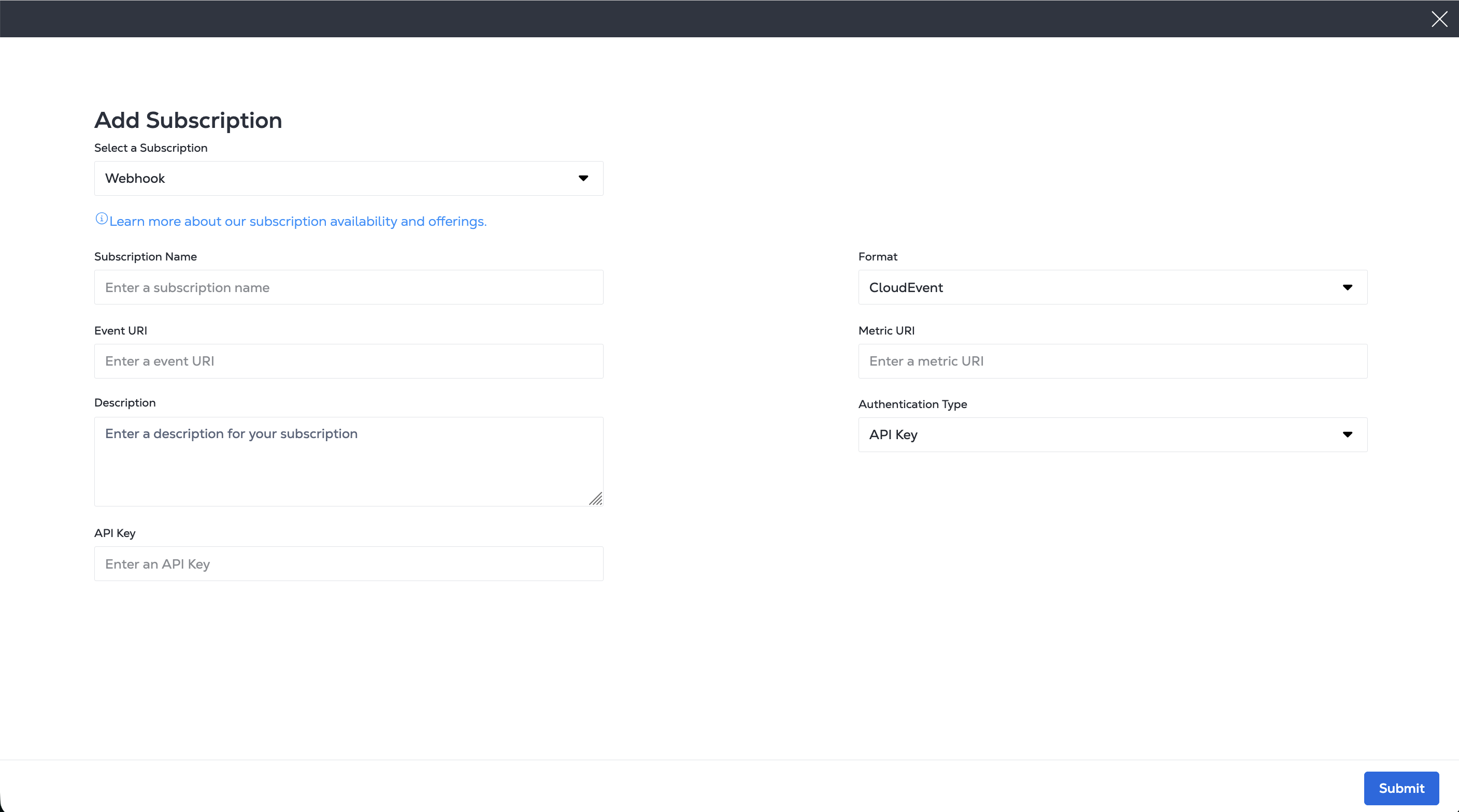
En la página Añadir suscripción, introduzca la información de su Webhook, que incluye:
- Un nombre de suscripción
- Seleccione el formato CloudEvent o el formato Open Telemetry para sus datos de flujo.
- El URI del evento
- El URI métrico
- Seleccione un tipo de autenticación entre las opciones Sin autorización, nombre de usuario/contraseña, token de acceso ni clave de API. Introduzca la información relevante en los campos proporcionados.
- Y proporcione una descripción (opcional).
Para crear una suscripción de webhook, envíe una POST solicitud al /fabric/v4/streams/<streamId>/subscriptions punto final. Especifique el ID de flujo en la stream ruta de su solicitud.
En el sink objeto del cuerpo de la solicitud, proporcione los campos necesarios para su tipo de fregadero. Incluye:
- Especifique el
typeASWEBHOOK. - Proporcione un URI de evento o un URI de métrica o ambos. Especifique el formato.
- Proporcione información de autenticación relevante, incluidas opciones de nombre de usuario/contraseña, token de acceso o clave de API. Si no se requiere autenticación, puede omitir el
credentialsobjeto.
Ejemplo de solicitud cURL:
curl -X POST 'https://api.equinix.com/fabric/v4/streams/<streamId>/subscriptions' \
-H 'Content-Type: application/json' \
-H 'Authorization: Bearer <Bearer Token>' \
-d '{
  "type": "STREAM_SUBSCRIPTION",
  "name": "<webhook_subscription_name>",
  "description": "<webhook_subscription_desc>",
  "enabled": true,
  "sink": {
    "type": "WEBHOOK",
    "settings": {
      "eventUri": "<webhook_uri>",
      "metricUri": "<webhook_uri>",
      "format": "<format>"
    }
  }
}'