Router Cisco Catalyst 8000V (modo controlador)
- Hoja de datos del software Cisco Catalyst 8000V Edge
- Software de ADN de Cisco para SD-WAN y guía de pedidos de enrutamiento
Opciones de licencia
- Traiga su propia licencia (BYOL)
Tipos de implementación
- Dispositivo único
- Dispositivos redundantes
Opciones de conectividad
- Con una dirección IP pública
Detalles del dispositivo
| 2 núcleos | 4 núcleos | 6 núcleos | 8 núcleos | 16 núcleos | |
|---|---|---|---|---|---|
| Memoria | 8 GB | 8 GB | 16 GB | 16 GB | 16 GB |
| Paquete de software | ADN esencial Ventajas del ADN DNA Premier | ||||
| Interfaces de datos virtuales admitidos (predeterminado/máximo) | 10 / 24 | ||||
| Interfaces reservadas del sistema | GigabitEthernet 1 (gestión) GigabitEthernet 2 (WAN/SSH) | ||||
| Métodos de acceso | HTTPS (consola web) VManage | ||||
| Versión de imagen | Ver versiones de imágenes disponibles | ||||
| Comandos CLI restringidos | Ninguna |
Requisitos previos
Los requisitos previos para implementar Cisco Catalyst 8000V en el modo SD-WAN Controller son:
- Credenciales de inicio de sesión de Cisco.com.
- Las licencias de ADN adecuadas desde Cisco.com para aprovisionar y operar el dispositivo Catalyst 8000V. Esta licencia se instala en vManage, no en Equinix.
- Su software Cisco vManage (controlador) debe estar en funcionamiento y operativo (no gestionado por Equinix).
Genere un archivo de configuración de Bootstrap
-
Inicie sesión en Cisco vManage SD-WAN Controller.
-
Localice el dispositivo SD-WAN Edge en el controlador.
-
En el menú vManage de Cisco, seleccione Configuración > Dispositivos.
-
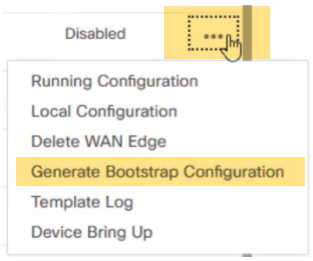
Seleccione el C8000V SD-WAN lógico que está utilizando para su nuevo dispositivo Network Edge, haga clic en las elipsis y seleccione Generar configuración de arranque .
 nota
notaSe rellena un número de chasis para su C8000V sincronizando su cuenta inteligente en el Administrador SD-WAN después de que se deposite su licencia en su cuenta inteligente. Seleccione cualquier número de chasis no utilizado para generar el archivo de bootstrap. Es importante seguir el paso 4 anterior antes de crear un perfil.
-
En el BOX de configuración de Generar arranque, seleccione Nube-Init y haga clic en Aceptar. Seleccionar Incluir certificado raíz predeterminado es opcional.
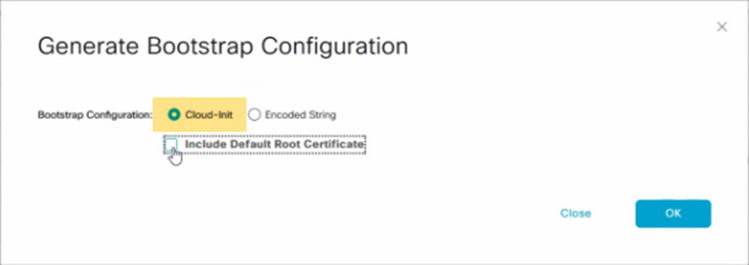
El cuadro Generar configuración de arranque muestra la configuración de arranque, incluido el token OTP para la licencia, la dirección de vBond, el UUID y la información de la organización.
-
Haga clic en Descargar en el BOX de configuración de Generar arranque para guardar una copia de la configuración de bootstrap.
-
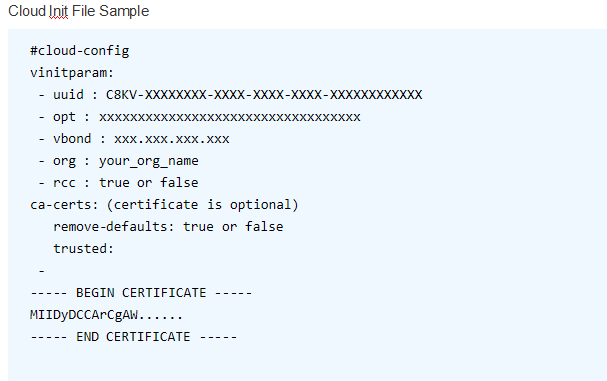
Valide el contenido del archivo de bootstrap para asegurarse de que no se incluye información adicional. El siguiente ejemplo muestra el formato válido y los atributos permitidos en el archivo cloud-init que se cargarán en el flujo de trabajo de creación de dispositivos C8000V.
 nota
notaEste es un ejemplo de un archivo cloud-init. Utilice el archivo descargado de vManage y no lo modifique. Para obtener la documentación más actualizada sobre la generación de bootstrap, consulte Proceso de Bootstrap para dispositivos alojados en la nube SD-WAN de Cisco .
-
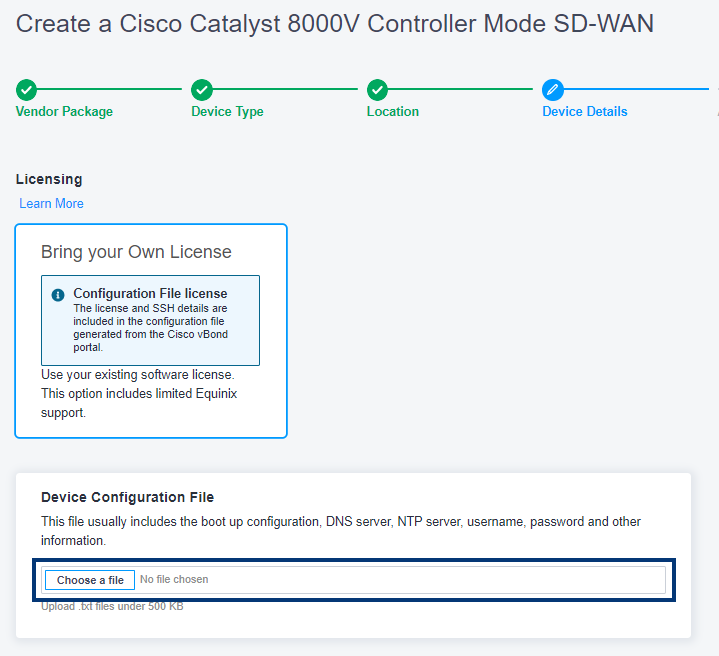
Mientras especifica los detalles de su dispositivo, cargará el archivo de configuración del mismo.