Preferencias de Notificación
Utilice este procedimiento para asegurarse de recibir actualizaciones importantes, personalizar las notificaciones que recibe y desactivar las notificaciones que no necesita.
Para obtener información sobre cómo ver las notificaciones en el portal, consulte Centro de notificaciones .
Tipos de notificaciones
Las opciones están disponibles para:
| Tipo de notificación | Descripción | Permisos necesarios |
|---|---|---|
| Preferencias de notificaciones de pedidos | Reciba notificaciones por correo electrónico para pedidos recibidos, pedidos programados, pedidos completados y eventos modificados. | N/A |
| Preferencias de notificaciones de IBX | Reciba notificaciones de eventos de mantenimiento de IBX, incidentes de IBX, incidentes de seguridad de IBX y avisos de IBX. Nota: Las notificaciones de Smart View (para alertas y eventos de mantenimiento) se administran en Equinix Smart View. Para obtener más detalles, consulte la documentación de Equinix Smart View . | Permisos de notificaciones de los servicios gestionados |
| Preferencias de notificaciones de red | Reciba notificaciones de eventos de mantenimiento de red e incidentes de red. | Permisos de notificaciones de los servicios gestionados |
| Preferencias de notificación de los servicios gestionados | Reciba notificaciones de eventos de mantenimiento de IBX de servicios gestionados, eventos de mantenimiento de red de servicios gestionados e incidentes de servicios gestionados. | Permisos de notificaciones de los servicios gestionados |
| Preferencias de notificación del Plan de asistencia Smart Hands | Reciba notificaciones por correo electrónico sobre el uso de las horas de su Plan de Soporte Mensual y las horas del Plan de Soporte Prepagado. | Permisos del Plan de soporte Smart Hands |
| Preferencias de notificaciones de envíos sin previo aviso | Reciba notificaciones por correo electrónico cuando envíos sin previo aviso lleguen a sus IBX. | Permisos de notificaciones de los servicios gestionados |
| Preferencias de notificación de recursos virtuales | Reciba notificaciones sobre los activos virtuales de Fabric y Network Edge. | Permiso de notificación de recursos virtuales |
| Preferencia de notificación de violación de políticas de IBX | Recibir notificaciones sobre violaciones de las políticas IBX (como la aplicación de nuestra política de materiales combustibles y nuestra política de gestión de flujo de aire). Al menos dos administradores de su organización deben estar configurados para recibir infracciones de políticas IBX. Nota: Si una infracción no se corrige dentro del tiempo asignado, se crea automáticamente una orden de Smart Hands facturable. Los técnicos de IBX corregirán el problema, y su empresa incurrirá en una tarifa de Smart Hands. | Permisos de notificaciones de los servicios gestionados |
IMPORTANTE: Si alguna de las fichas de preferencias de notificación está atenuada, esto indica que no tiene permisos para recibir esas notificaciones. Póngase en contacto con el administrador del Portal del cliente de su empresa para solicitar permisos o consulte la páginaPermisos.
Actualizar sus preferencias de notificación
Para cambiar sus preferencias de notificación en el Portal del cliente:
-
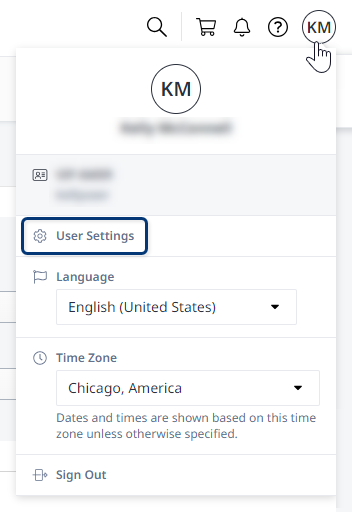
Haga clic en su nombre de usuario en el encabezado del perfil global y seleccione Configuración de usuario.
-
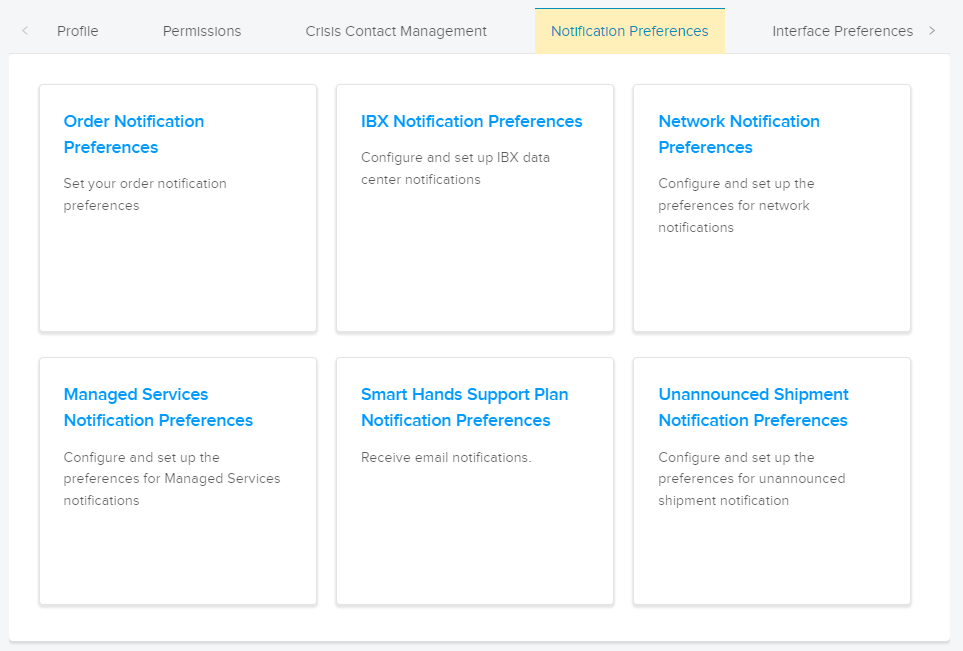
Haga clic en la pestaña Preferencias de notificación y seleccione una categoría.
-
Elija el tipo(s) de notificaciones que desee.
Para algunas categorías, solo puedes recibir notificaciones por correo electrónico. Para otros, puede elegir recibir correo electrónico, SMS (mensajería de texto) y / o notificaciones de voz.
notaLas notificaciones de voz no son compatibles con los teléfonos en China.
-
Haga clic en Enviar para confirmar los cambios.
Repita estos pasos para establecer sus preferencias para otras categorías de notificaciones.