Digital Letters of Authorization (LOA)
The Digital LOA Manager enables customers to request, issue, and manage Letters of Authorization (LOAs) through a centralized workflow. An LOA grants permission to establish a connection or perform a specific action involving a resource owned by another party. By streamlining approvals between requesters and resource owners, Digital LOA Manager helps organizations manage authorization workflows consistently across products such as Cross Connect and other supported services.
Digital LOA Manager
The DLOA Manager streamlines the LOA process by routing requests between requesters and issuers. A requester submits an LOA request, which is routed to the appropriate issuer for review. The issuer then approves or rejects the request. Once approved, the LOA becomes available for use with the associated service or workflow.
Both the legacy and new DLOA Manager experiences are currently available, allowing you to switch between experiences as needed. The new Digital LOA Manager experience includes the following enhancements:
- Unique LOA names for easier tracking and management.
- Product-based categorization of LOAs.
- Support for port, cage, and patch panel authorization levels.
- Streamlined request and approval workflows that support scenarios where requester email or organization information is unavailable.
- Improved requester and issuer inventories.
-
Sign in to the Customer Portal.
-
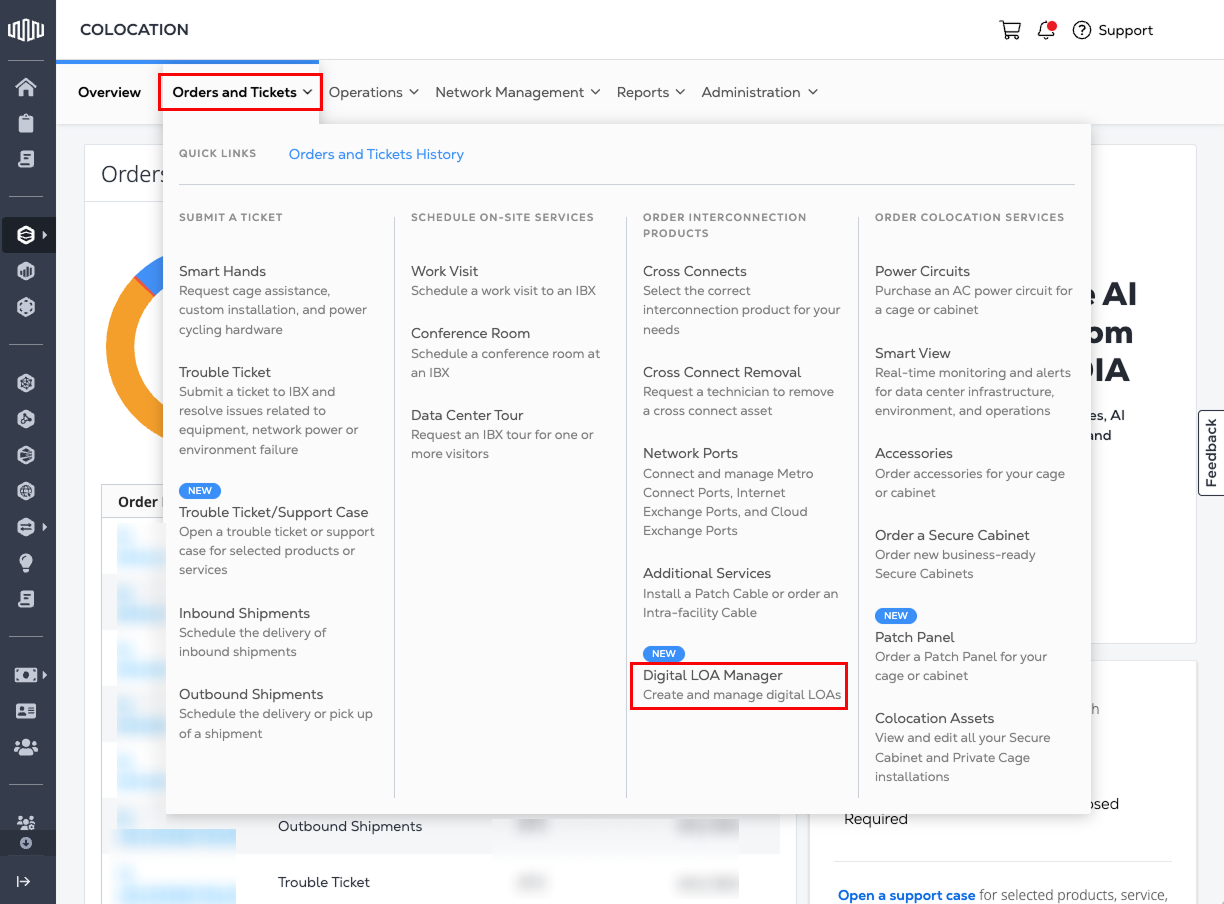
Go to the Orders and Tickets menu and select Digital LOA Manager.
-
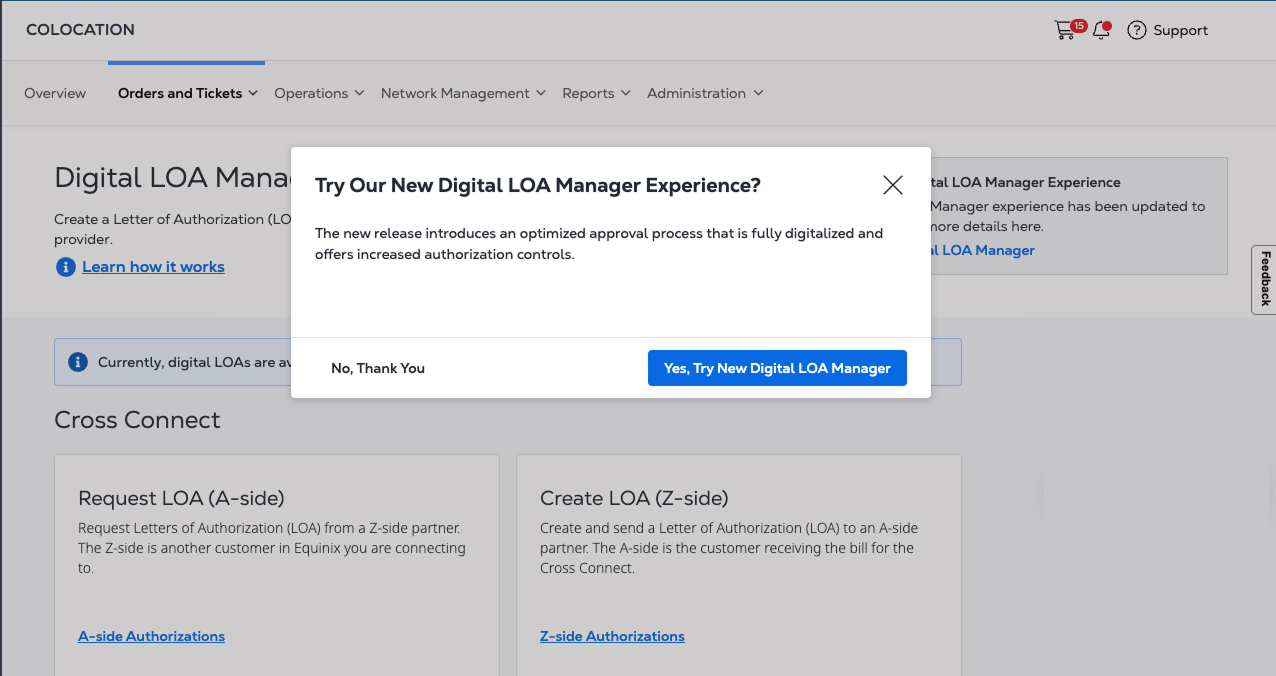
When prompted, click Yes, Try New Digital LOA Manager to switch to the new experience, or click No, Thank You to continue using the legacy experience.
Legacy Digital LOA Manager
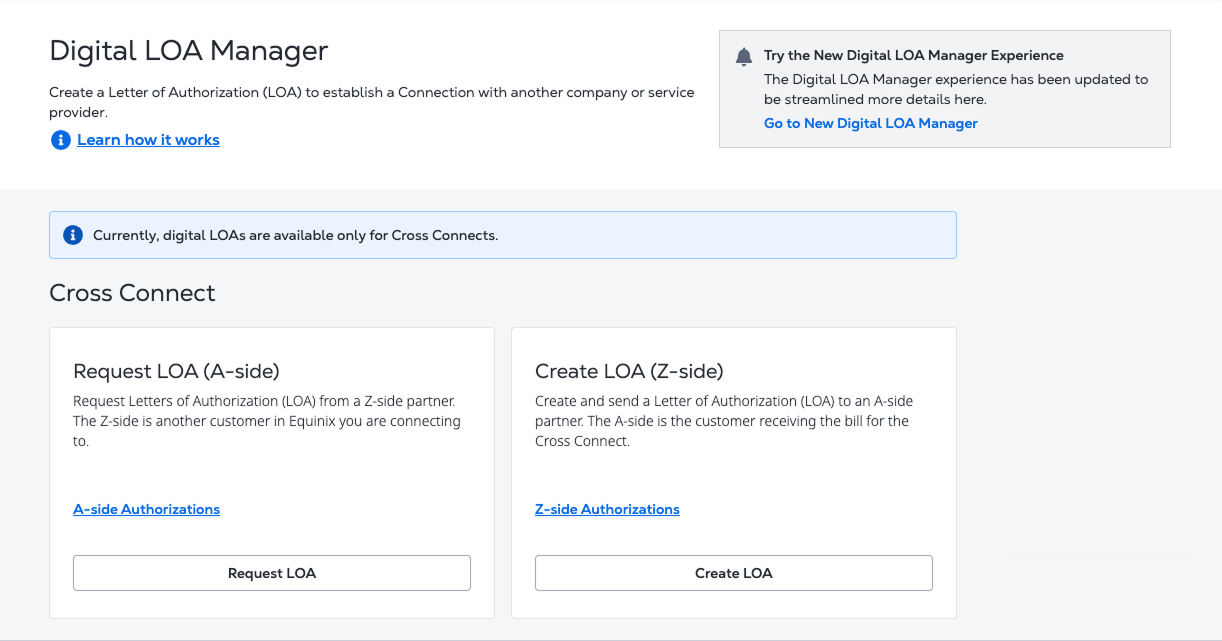
Use legacy digital LOAs only for Cross Connects. For all other products, use the new DLOA experience.
A Digital LOA is an electronic authorization that replaces traditional, manually created LOAs. It enables the setup of a Cross Connect within an IBX data center by allowing an A-side partner to request authorization from a Z-side partner.
In the legacy Digital LOA Manager, the A-side partner initiates and pays for the Cross Connect, while the Z-side partner owns the assets required for the connection and issues the LOA that authorizes its use.
If you are the A-side partner, you can request an LOA from a Z-side provider. Select A-side Authorizations to view LOAs issued to you by Z-side partners.
If you are the Z-side partner, you can create and send an LOA to an A-side provider. Select Z-side Authorizations to view LOAs you have issued.
A Digital LOA must be created and approved before a Cross Connect can be established between the A-side and Z-side partners.
New Digital LOA Manager
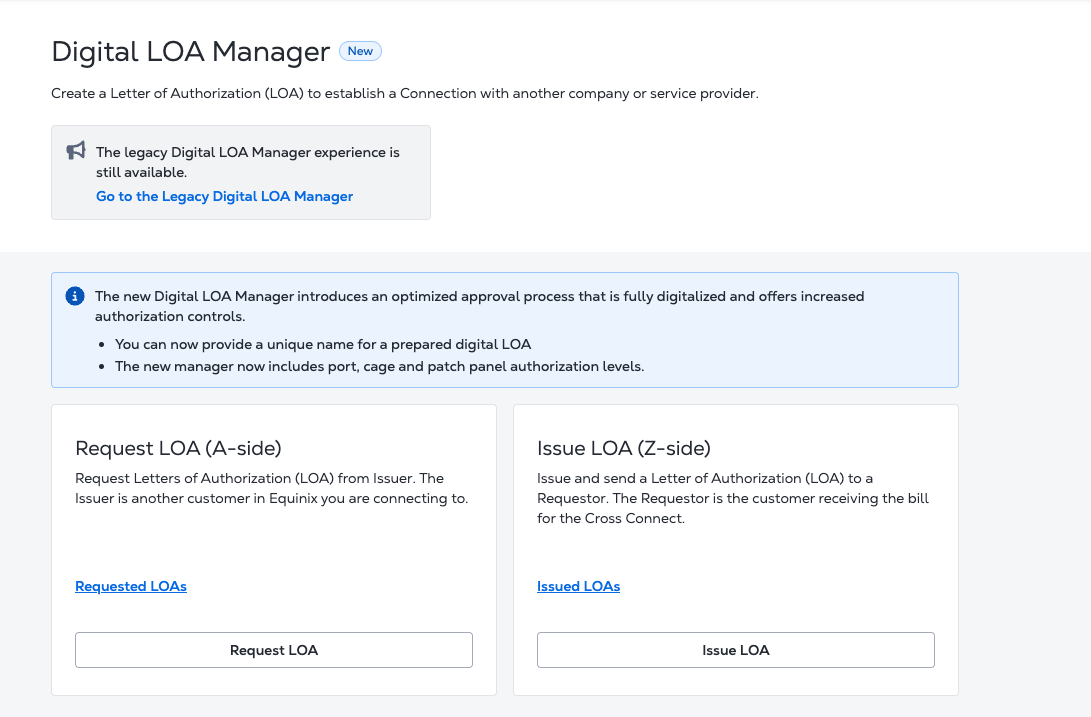
With the new Digital LOA Manager, you can request an LOA from an Issuer, an Equinix customer you are connecting to. Select Requested LOAs to view LOAs created for you. You can also issue and send an LOA to a Requestor, the customer receiving the bill for the order. Select Issued LOAs to view LOAs created by you.
Requestors and Issuers
The Requestor submits LOA requests for resources that require authorization from another party. Requestors can create LOA requests, track request statuses, view requested LOAs, and manage active requests.
The Issuer reviews and authorizes requests for resources they own or administer. Issuers can review requests, approve or reject requests, issue LOAs, and manage issued LOAs.
Key Terms in DLOA Manager
| Term | Definition |
|---|---|
| Digital LOA Authorization Level | The type of authorization being requested, such as Port-to-Patch Panel, Patch Panel-to-Patch Panel, or Cage-to-Cage. |
| Product | The authorized product type. Cross Connects (XC) are supported. Fabric Port and Network Edge are not supported in this release. |
| Issuer Connection Details | The equipment or demarcation point being authorized. |
| LOA Expiry Date | The date when the LOA expires. By default, an LOA expires three months from its creation date, which is also the maximum allowed duration. |
| Additional Notes for Partner | Optional information included with the LOA and shared with the counterparty. |
| Action Required | LOAs that require action from your organization. |
| Accept | The action used by the requestor to complete an issuer-first LOA workflow. |
| Authorize | The action used by the issuer to complete a requestor-first LOA workflow or reconfirm authorization after acceptance. |
| Ready for Use | The LOA has been fully authorized, but no cross connect is attached. |
| In Use | A cross connect is attached to the authorization. |
| Organization identified | The platform has identified the Equinix organization associated with the counterparty. If the organization cannot be identified, an additional confirmation step is required after acceptance. |
| Email confirmed | The email address belongs to the identified organization. Only confirmed email addresses can be used when creating an LOA. |
| Existing relationship | Indicates whether the two organizations already have cross connects with each other. Existing relationships can allow an LOA to be approved automatically without requiring acceptance. |