MCP Server Overview
The Fabric MCP server allows AI assistants and developer tools to call the Equinix Fabric API on your behalf. Model Context Protocol (MCP) is an open protocol for connecting these tools to external services. An MCP client can search and modify your Fabric resources without requiring you to write API code.
The Fabric MCP server is in public preview. Tools, descriptions, and response formats may change before general availability.
For feedback, questions, or help with the MCP server, email fabric-intelligence-support@equinix.com.
| Server URL | Tools | Description |
|---|---|---|
https://mcp.equinix.com/fabric | Fabric Tools | Connections, ports, Cloud Routers, routing, service profiles, and telemetry. |
Supported MCP Clients
The following clients are supported:
- Claude Desktop, Anthropic's desktop application
- Claude Code, Anthropic's terminal agent
- Cursor, the AI code editor
- Visual Studio Code, through GitHub Copilot
- Codex, through the CLI or desktop app
- Gemini CLI, Google's terminal agent
- OpenCode, the open-source terminal agent
Other MCP clients that support remote servers with OAuth might work, but they are not tested. For more information, see Other MCP Clients.
Tool Limits in Your Client
The Fabric MCP server publishes more than 100 tools. Some clients limit the number of tools a model can load at one time. Visual Studio Code allows a maximum of 128 tools across all sources, and Windsurf allows 100. Running multiple MCP servers concurrently can exceed these limits, which causes requests to fail or tools to be omitted without notice.
If you reach a client tool limit, disable the MCP servers you are not using. Some clients load tool definitions on demand rather than all at once, which avoids the limit.
Prerequisites
- An Equinix Customer Portal account with Fabric access
- An MCP client that supports remote MCP servers with OAuth
No additional software is required. There is no package to install and no token to generate. Your client completes the login in a browser.
Authentication
The server uses OAuth 2.1 and supports both Dynamic Client Registration (DCR) and Client ID Metadata Documents (CIMD). Your client uses whichever method it implements. Most clients currently use DCR. Visual Studio Code also supports CIMD.
- Add the server URL to your client's configuration, as described in Setup and Configuration.
- The client detects that it has no token and prompts you to connect.
- A browser window opens. Log in with your Equinix Customer Portal credentials.
- Select a permission level on the approval screen, then approve the request. For more information, see Permissions Model.
- The client stores the tokens and refreshes them in the background.
Complete this process once per client. The session remains valid until it expires or you revoke it.
Token Lifecycle
Access tokens are short-lived and are bound to the server you authorized them for. Clients registered with a Client ID Metadata Document also receive a rotating refresh token and renew in the background, so you are rarely prompted to log in. Clients registered through DCR renew through the browser flow, so they prompt you to log in more frequently.
If a session expires or you revoke it, the client prompts you to log in again.
Setup and Configuration
Every client follows the same three steps: add the server URL, save the configuration, and restart the client. Only the file location and the configuration format differ. The Fabric server URL is https://mcp.equinix.com/fabric.
Claude Desktop
You can add the server through the Connectors page or by editing the configuration file. Anthropic documents both methods in custom integrations using remote MCP.
Option 1: Add via Connectors (Recommended)
-
Open Claude Desktop and click your profile menu, then Settings.
-
In the Settings sidebar, click Connectors.
-
Click Add custom connector.
-
Enter a Name (for example,
Fabric MCP) and set the Remote MCP server URL tohttps://mcp.equinix.com/fabric, then click Add.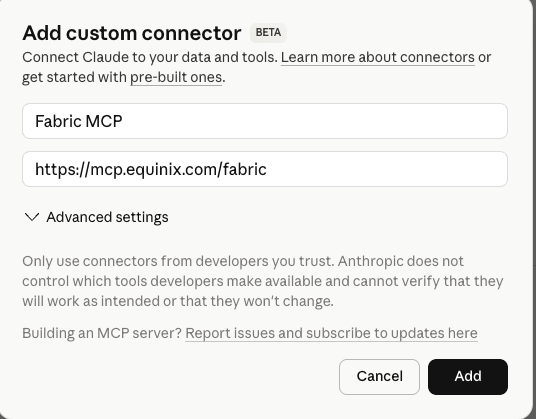
-
Click Connect next to the new connector. A browser window opens where you authenticate with your Equinix Customer Portal credentials.
If the session expires, the connector displays "Connection has expired." Click Connect to log in again.
Option 2: Edit the Configuration File
Configuration file location:
- macOS:
~/Library/Application Support/Claude/claude_desktop_config.json - Windows:
%APPDATA%\Claude\claude_desktop_config.json
You can also open the configuration file from Settings > Developer > Edit Config inside Claude Desktop.
Fabric MCP Server example:
{
  "mcpServers": {
    "Equinix Fabric MCP Server": {
      "url": "https://mcp.equinix.com/fabric"
    }
  }
}
Save the file and restart Claude Desktop. The browser login opens the first time you use a Fabric tool.
Claude Code
Add the server from the command line:
claude mcp add --transport http fabric-mcp https://mcp.equinix.com/fabric
Add -s user to the command to make the server available in every project rather than only the current project.
Then authenticate:
/mcp
Select fabric-mcp from the list and complete the browser login. This screen also displays connection status, which distinguishes an expired session from a configuration error.
You can also edit the configuration file directly. In ~/.claude.json:
{
  "mcpServers": {
    "fabric-mcp": {
      "type": "http",
      "url": "https://mcp.equinix.com/fabric"
    }
  }
}
Cursor
Cursor reads MCP servers from a JSON file. For more information, see the Cursor MCP documentation.
Configuration file location:
- Project-level:
.cursor/mcp.jsonin your project root - Global:
~/.cursor/mcp.json
You can also add servers through Cursor Settings > Tools & MCP > New MCP Server.
Fabric MCP Server example:
{
  "mcpServers": {
    "Equinix Fabric MCP Server": {
      "url": "https://mcp.equinix.com/fabric"
    }
  }
}
Restart Cursor. Cursor prompts you to log in the first time it connects.
Visual Studio Code
Visual Studio Code stores MCP servers in mcp.json. For the full set of options, see the Visual Studio Code MCP documentation.
Configuration file location:
- macOS/Linux:
.vscode/mcp.json(workspace) or~/.vscode/mcp.json(user) - Windows:
.vscode\mcp.json(workspace) or%USERPROFILE%\.vscode\mcp.json(user)
Fabric MCP Server example:
{
  "servers": {
    "fabric-mcp": {
      "type": "http",
      "url": "https://mcp.equinix.com/fabric"
    }
  }
}
Restart Visual Studio Code, or reload the window (Cmd+Shift+P on macOS, Ctrl+Shift+P on Windows and Linux, then Developer: Reload Window). The browser login opens on first use.
Gemini CLI
Gemini CLI reads MCP servers from settings.json. For more information, see the Gemini CLI MCP documentation.
Configuration file location:
- Global:
~/.gemini/settings.json - Project-level:
.gemini/settings.json
Fabric MCP Server example. This client requires the httpUrl key rather than url:
{
  "mcpServers": {
    "fabric-mcp": {
      "httpUrl": "https://mcp.equinix.com/fabric",
      "oauth": {
        "enabled": true
      }
    }
  }
}
Restart Gemini CLI, then authenticate:
/mcp auth fabric-mcp
This command opens a browser and listens on http://localhost:7777/oauth/callback, so run it on a system with a browser. It does not work over an SSH session without browser forwarding. Run /mcp auth without arguments to list the servers that still require a login.
OpenCode
OpenCode stores MCP servers in its configuration file under the mcp key. For more information, see the OpenCode MCP documentation.
Configuration file location:
- Project-level:
opencode.jsonin your project root - Global:
~/.config/opencode/opencode.json
Fabric MCP Server example:
{
  "$schema": "https://opencode.ai/config.json",
  "mcp": {
    "fabric-mcp": {
      "type": "remote",
      "url": "https://mcp.equinix.com/fabric",
      "enabled": true
    }
  }
}
OpenCode runs the OAuth flow the first time it uses the server. You can also start the flow manually:
opencode mcp auth fabric-mcp
Codex
You can add the server through the CLI, the desktop application, or the configuration file.
Option 1: Add via CLI (Recommended)
-
Install Codex CLI using the Codex CLI setup documentation.
-
Add an MCP server using the following command:
codex mcp add fabric-mcp --url https://mcp.equinix.com/fabric -
Run the login command:
codex mcp login fabric-mcpA browser window opens where you authenticate with your Equinix Customer Portal credentials.
Option 2: Add via Codex Desktop
-
Open Codex Desktop.
-
Go to Settings.
-
In the settings sidebar, click MCP Server.
-
Click Add Server.
-
Enter a Name (for example,
Fabric MCP), select Streamable HTTP as the type, set the URL tohttps://mcp.equinix.com/fabric, then click Save.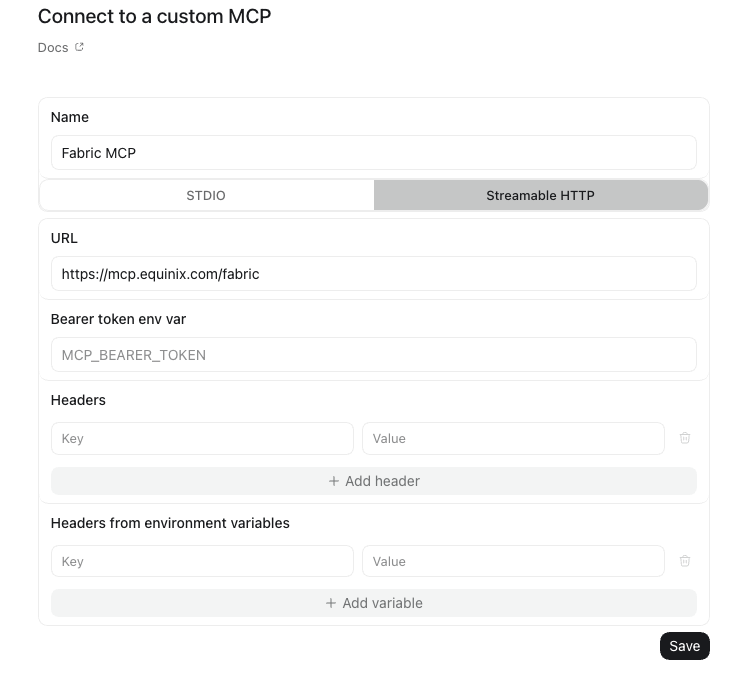
-
After adding the server, run the login command from your terminal:
codex mcp login fabric-mcpA browser window opens where you authenticate with your Equinix Customer Portal credentials.
Option 3: Edit the Configuration File
Configuration file location:
~/.codex/config.toml(user-level).codex/config.toml(project-level)
Fabric MCP Server example:
[mcp_servers.fabric]
url = "https://mcp.equinix.com/fabric"
Save the file and restart Codex Desktop, then log in when prompted.
Other MCP Clients
Add https://mcp.equinix.com/fabric in the format your client requires for a remote MCP server. The client handles the OAuth flow. Clients that are not listed in Supported MCP Clients are not tested. If an untested client fails to connect, verify the server with a supported client before you open a support case.
Permissions Model
The Fabric MCP server calls the Fabric API as the user who logged in. Every call is attributed to that user in the audit log, in the same way as a direct API call. The server cannot perform any operation that the user's account is not already permitted to perform.
Two controls determine what a connected client can call:
- Account roles. The roles assigned to your Equinix Customer Portal account set the maximum level of access. Connecting through MCP does not increase it.
- Permission level. When a client connects, you select a permission level on the approval screen. The following levels are available:
| Permission level | Description |
|---|---|
fabricViewer | Read-only access. Searches and lookups, such as searchNetworks or getNetworkByUuid. |
fabricOperator | Viewer access, plus modification of existing resources and attach or detach operations, such as updateNetwork. |
fabricManager | Operator access, plus creation of resources, such as createNetwork or createRouter. |
The issued token grants the intersection of the two controls. A permission level below the account's roles restricts the client. A permission level above the account's roles does not grant additional access.
Use the narrowest permission level that covers the work. When configuring an agent that only answers questions about your inventory, the fabricViewer permission level is appropriate. A client configured with this permission level cannot change resources, even if the user has administrative rights.
Either control can reject a call. An authorization error is most often caused by a missing role on the account rather than by a restrictive permission level, so verify the account roles first.
No permission level grants delete access. The server publishes no delete tools, so connections, ports, Cloud Routers, and networks cannot be removed through the MCP server. Delete these resources in the portal or through the API.
Security Considerations
Review the following before you connect a client.
- Confirm write operations. Enable tool confirmation in your MCP client for any tool that creates or updates a resource. Most clients prompt by default, but verify the setting, because some create operations incur charges immediately. Ordering a port or a Cloud Router through an agent is billed at the same rate as ordering one in the portal.
- Connect only trusted clients. Any MCP client can initiate an authentication request to Equinix. Approving the request grants that application access to your account for the duration of the session. Confirm that the request originated from an application you installed and configured, and decline any request that arrives from a link or from an unrecognized application. Clients that support Client ID Metadata Documents identify themselves with a document published at a stable URL, which is a stronger indicator of identity than dynamic registration alone. The approval decision remains yours in either case.
- Treat tool output as untrusted input. Tool responses include user-defined text, such as connection names, project names, and tags. A resource named to resemble an instruction can cause an agent to call a tool you did not request. Keep confirmation enabled for write tools, and evaluate the risk before you run the Fabric MCP server alongside servers that retrieve untrusted content, such as web browsers or email clients.
- Understand where your data is sent. Your prompts and the tool responses they generate pass through the model that your MCP client uses, subject to that vendor's terms. Any data the server returns, including connection names, port inventory, and telemetry, becomes part of that conversation. If your organization restricts where infrastructure data can be sent, review the client and its underlying model before you connect. Equinix records the API calls the server makes on your behalf in the same way as any other API traffic from your account.
To revoke access for a client you no longer recognize, see Reviewing and Revoking Access.
Reviewing and Revoking Access
Every client you authorize shows up under AI Consent Management in your Equinix User Account, reachable from User Account > Access > AI Consent Management. The list gives you each client by name, whether its consent is still granted, when you authorized it, and when it last called Equinix.
Use this page to identify which agents can currently reach your Fabric account and which agents are inactive. Click Revoke on a row to end that client's access, or select multiple rows and revoke them together.
Revoke access when a device is lost, when you no longer use a client you previously tested, or when a last activity date does not correspond to your own usage.
Removing the server from a client's configuration does not revoke access. That change stops the local client from calling the server, but the authorization remains active until you revoke it.
The MCP server does not bypass any permission or account requirement. If a direct API call would be rejected for missing entitlements or an invalid account state, the MCP call is rejected too.
Verify the Connection
After the client restarts and you complete the browser login, issue a read-only request:
List the Equinix Fabric metros.
A list of metro codes confirms that the server is connected and the token is valid. An authorization error indicates that the login did not complete. Check the client's MCP logs first.
Troubleshooting
Authentication Failed
The client cannot authenticate, or it reports an authorization error when it connects.
- Verify that your Equinix Customer Portal account is active.
- Remove the server from the client, add it again, and complete the browser login.
- Clear the client's cached credentials if the client supports it, then restart the client and log in again.
The Server Is Not Responding
The client cannot reach the server, or no tools are listed.
- Verify that the system can reach
https://mcp.equinix.com/fabric. - Compare the URL and the configuration file format against the examples in Setup and Configuration.
- Restart the client to reinitialize the connection.
- Review the MCP server logs in the client for the specific error.
- If the server connects but only some tools are listed, see Tool Limits in Your Client.
Permission Denied
A call fails with a permission or authorization error.
- Verify the roles on the account you logged in with. This is the most common cause.
- Verify the permission level you selected when you connected. A client connected with
fabricViewercannot perform write operations, regardless of the account's roles. Reconnect and selectfabricOperatororfabricManagerif the operation requires it. - Verify that the account has access to the project that contains the resource.
- If you requested a delete operation, note that the server publishes no delete tools. Use the portal or the API.
Session Expired
Calls that previously succeeded begin to fail with authentication errors. Clients renew tokens automatically, so this condition usually indicates that the authorization was revoked or could not be renewed. Verify that the client is still granted under Reviewing and Revoking Access.
- Restart the client to trigger a new login.
- Complete the browser flow when prompted.
- If the condition persists, remove the server configuration and add it again.
Rate Limiting
The server is subject to the same rate limits as direct API access. Reduce the request rate, or contact Equinix Customer Support to review your limits.
Additional Resources
- Fabric Tools - The tools this server publishes.
- Fabric API Reference - The API that the tools call.
- IAM Roles and Permissions Reference - The operations each role permits.
- API Authentication - Authentication for direct API access.
- Model Context Protocol Specification - The protocol specification.