Customer Installation Guidelines
These guidelines apply to customer installation of IT equipment in Equinix IBX data centers and support compliance with Equinix standards and policies. Incorrect installation can affect equipment performance and impact Service Level Agreement claims. Refer to Data Center Design for more information.
Server energy efficiency
Customer IT equipment accounts for approximately 70% of the energy consumed in Equinix data centers (based on Equinix’s global annual PUE of 1.42 as of December 2023). Applying built-in server power management features supports reduced energy consumption, lower carbon emissions, and improved equipment reliability. In some cases, this is a legal requirement (for example, the Netherlands). Review IT equipment settings and apply these measures where applicable.
Energy Star provides an overview of approaches to implementing built-in server power management and guidance on reducing idle server energy use. Ensure servers have variable fan speed cooling enabled. This improves the efficiency of data center cooling systems and supports server reliability at elevated temperatures (Reference ASHRAE TC9.9 2021 Thermal Guidelines, Section 2.4.5).
Customer’s equipment installation and operation
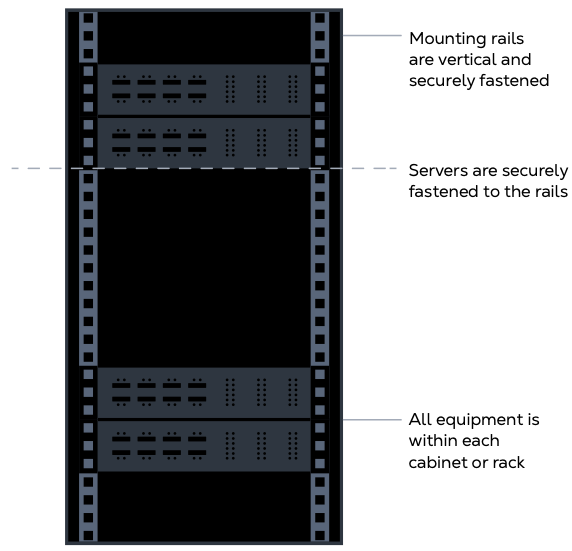
Customer’s equipment must not be stacked on or rest on any other equipment and must be securely fixed within a cabinet or rack. Heavier or higher-heat components should be installed in the lower sections of a cabinet to make effective use of the supplied cooling. Equinix may require removal of customer equipment that poses a safety risk or unreasonably interferes with the operations of Equinix or another customer.
Open cabinets
Open cabinets and two-post or four-post open racks are discouraged for active equipment due to poor air containment. Active equipment should be installed in closed cabinets where possible.
Passive equipment may be installed in an open cabinet. When used, the open cabinet should be located within the hot aisle. Open cabinets must not be placed at the end of an aisle, as this can obstruct end-of-aisle containment doors.
Existing deployments will be improved where possible in partnership with Equinix.
Airflow Management Policy
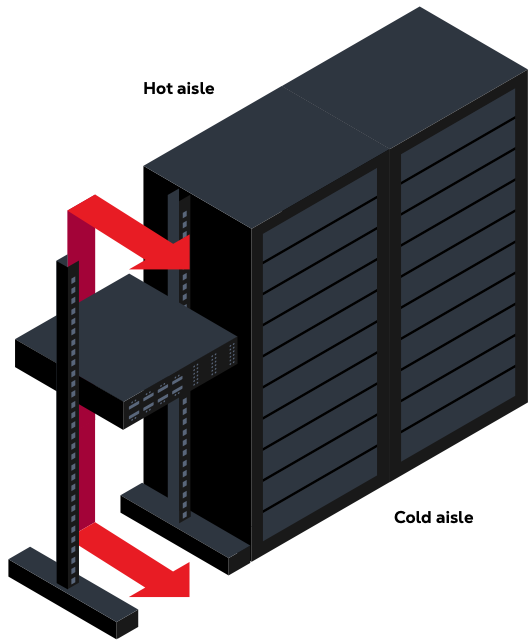
Correct equipment installation and airtight cold aisles are critical to maintain IT equipment within specified temperature and humidity ranges while supporting energy-efficient and sustainable operations.
To protect customer equipment from thermal risk and improve overall energy efficiency, Equinix is proactively enforcing its airflow management requirements in accordance with standard IBX Usage Policies sections D6 and D9.
To reduce data center energy consumption, Equinix is gradually increasing data hall temperatures, targeting up to 27°C (81°F) in the cold aisles. Achieving these targets requires effective airflow management measures to mitigate potential risks to customer equipment. Air leakage between the cold and hot aisles must be prevented. The cold aisle side of the cabinet shall be fully sealed using suitable accessories.
Aisle containment requirements
All new customer deployments must include hot or cold aisle containment systems as part of the day-one cage deployment.
At a minimum:
- Aisles must be enclosed up to cabinet height using self-closing doors, blocked-up cage walls, full-height cabinet infill panels, and blanking panels.
- Cold aisles must include drop-out ceilings where local regulations permit installation without modification of the fire suppression system.
- All containment installations must meet Equinix global design standards.
Where possible, Equinix will retrofit containment systems on existing deployments, with retrofit costs covered by Equinix. Customers may be responsible for costs resulting from significant changes to containment systems due to resizing of cage or cabinet deployments when associated with a sales order.
Cabinet infill panels
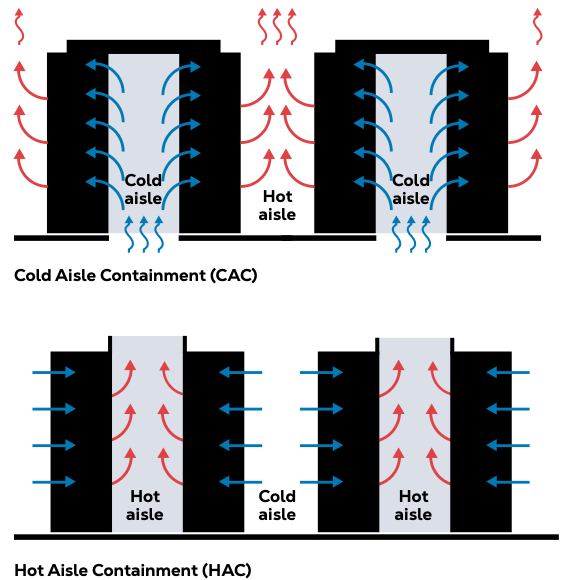
Where entire cabinets are missing or removed from a row or aisle, full-height cabinet infill panels shall be installed. The cabinet infill panels block the gap that the cabinet would otherwise occupy.
Contact Equinix when removing cabinets to schedule a temporary cabinet infill panel installation for the time of removal. When reinstalling cabinets, notify Equinix to collect and store the panel.
Equinix provides temporary cabinet infill panels at no charge, installed under non-billable Smart Hands orders. Cabinets removed for more than three months require permanent infill panels, which Equinix installs at no charge. Day-one deployments include charges for these panels in the Sales Order.
Equipment airflow direction
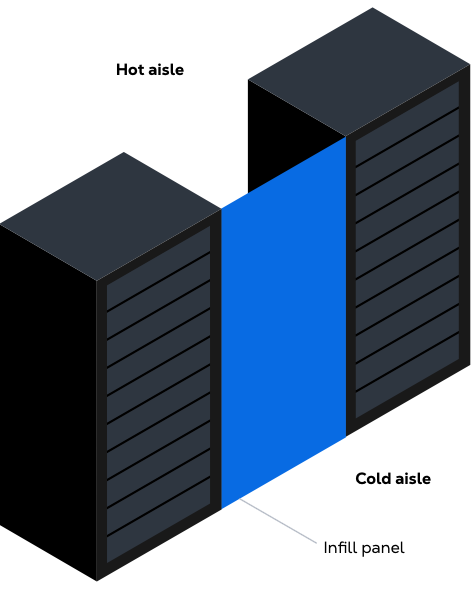
Equinix uses a hot aisle and cold aisle configuration, where each cabinet has a defined cold side and hot side. Equipment shall be installed in alignment with the conditioned airflow, with the air inlet on the cold side and the outlet on the hot side of the cabinet. This configuration ensures consistent intake air temperatures and prevents hot air recirculation. Equinix maintains temperature and humidity SLAs within the cold aisle only.
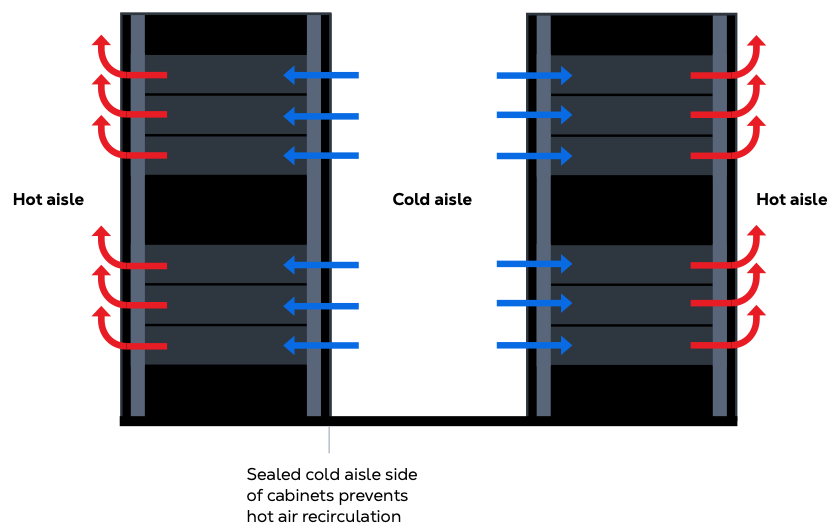
Incorrect airflow direction
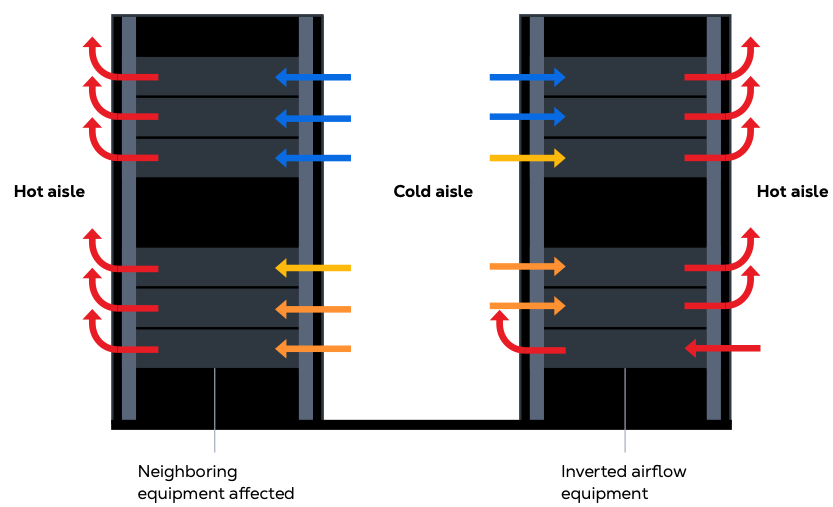
Incorrect airflow direction leads to cooling problems or equipment malfunction, which impacts the Service Level Agreement. Existing instances of incorrect airflow direction require remediation as soon as possible.
Equinix notifies customers when these issues are identified. Do not purchase equipment that causes inverted airflow issues. Such equipment remains permanently at risk due to high inlet air temperatures and causes unnecessary energy waste. Side air entry and exhaust equipment require suitable duct accessories to comply.
Cabinet air containment
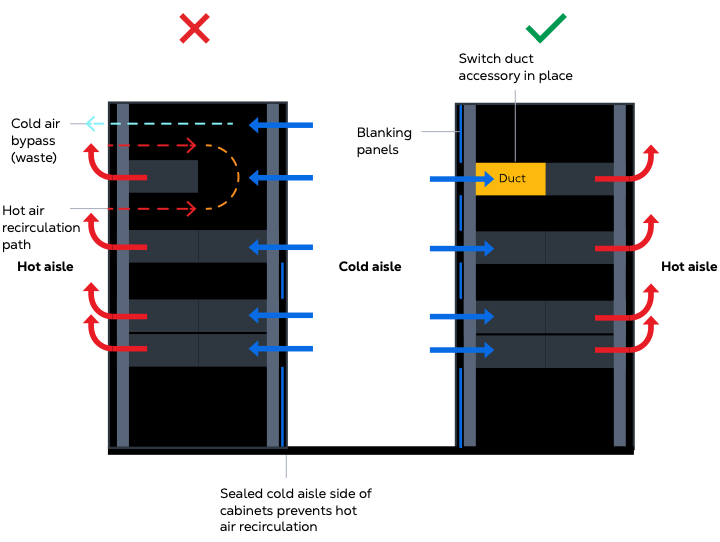
All open U-slots must be covered using blanking panels. Equinix provides 19 in, 21 in, or 23 in standard blanking panels at no charge and makes them available throughout the IBX. Where standard blanking panels do not fit, the customer provides or covers the cost of alternative products. Unused panels must be returned to the baskets provided. Equinix panels must be removed and returned before cabinets are removed from the data hall. Missing blanking panels cause hot spots and wasted energy.
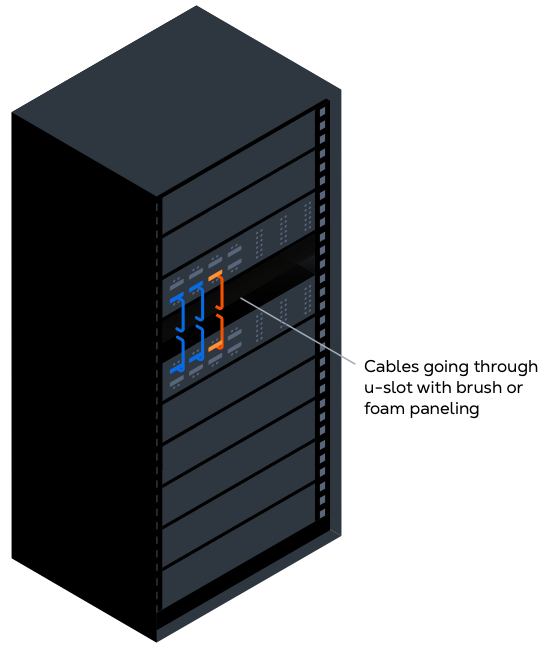
Where blanking panels cannot be used to seal open U-slots due to cables passing through, brush strips seal the opening. Brush strips mount to the cabinet rails using suitable fixings. Equinix recommends EZIBRUSH or an equivalent brush strip.
Remaining air gaps, including cable ways, rail and side panel gaps, and the top and bottom of the cabinet, are filled using fire-retardant foam strips. Equinix approves RackSEAL Air Barrier or an equivalent foam strip.
Customers purchase or provide brush and/or foam strips at their own cost. An allowance for these accessories should be included within the initial deployment budget.
Any recessed IT equipment (for example, equipment not aligned with the front of the cabinet, typically network switches) must be installed with air duct accessories that channel cold air directly to the equipment air intake. This prevents hot air recirculation and allows U-slots on either side to be blanked. Fan-assisted air ducts are not allowed.
Existing deployments require retrofitting if they cause hot spots or if more than one U-slot per switch remains open. Customers purchase or provide the required materials at their own cost. An allowance for these items should be included in the initial deployment budget.
Side panels are required in the following situations: end-of-aisle cabinets on the end-of-aisle side, and shared colocation areas.
Side panels may be removed in other situations if the customer ensures any remaining gaps on the front, cold aisle side are fully sealed. It is best practice to retain side panels in all situations and use dedicated cable pass-through openings for cabling between cabinets.
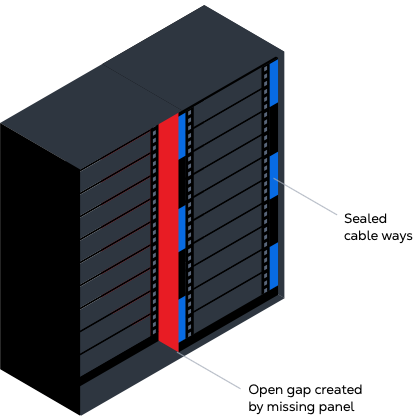
Existing gaps created by missing side panels must be sealed with suitable accessories to effectively seal the cold aisle.
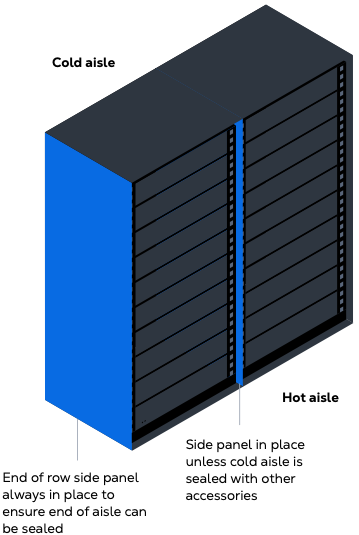
Side panel removal has historically been used to facilitate cabling between cabinets, often with cables that are too short to reach the provided cable trays and return to the adjacent cabinet. These practices create deployments that are difficult to manage from a cabling perspective.
Removal of side panels also creates gaps that are difficult to seal between the mounting rails and the cabinet door frame. These gaps represent up to six U-slots of missing blanking panels per missing side panel and are a major source of hot air recirculation and cold air bypass.
Cable management
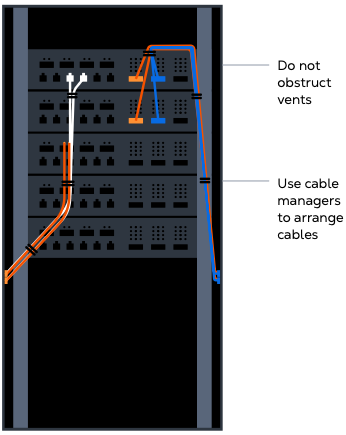
Adequate cable management is implemented so airflow is not obstructed when entering or exiting servers. Failure to do so can overheat IT equipment and constitutes a customer-caused incident that impacts Service Level Agreement claims. Cables are arranged using cable managers so they do not block airflow to or from the equipment.
Data cabling for interconnections between cabinets is ordered through the Customer Portal. The overhead infrastructure within a private cage is used for rack-to-rack connectivity within the cage. For cabinets in shared colocation space without cable passthroughs in the side panels, Intra-Customer Cross Connect is required.
Raised floor sealing
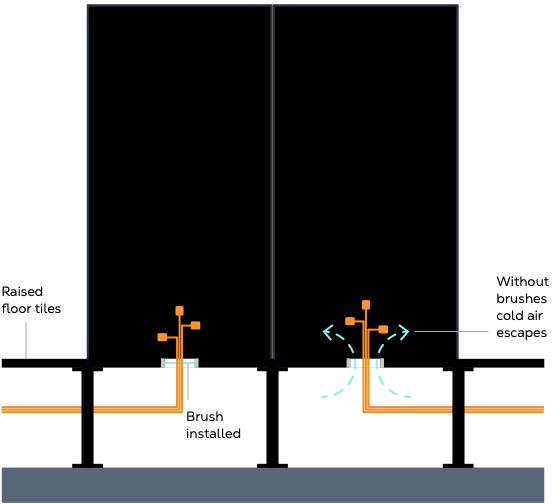
Cable entries from the raised floor into the cabinet must have brush seals or rubber grommets installed. If missing seals are identified, you can Contact Equinix. Equinix provides raised floor sealing materials and installation at no charge to cover missing seals on existing deployments.
Environmental sensors
Equinix uses wireless environmental temperature and humidity sensors to monitor conditions in the cold aisles. Not all sites currently have these sensors deployed and may use sensors located in other areas. This standard is being extended across all sites.
The sensors are magnetically attached and located on the face of the cabinet or on the cold aisle containment ceiling. Customers access temperature and humidity reports through Smart View or by request through the Customer Portal, with Smart View providing near real-time temperature and humidity conditions for an entire IBX and the cooling zones where their cages reside.
These sensors are the property of Equinix and must not be removed from the data hall. Before a cabinet is removed, the sensor is removed and left in the cage.
Power and external cabling
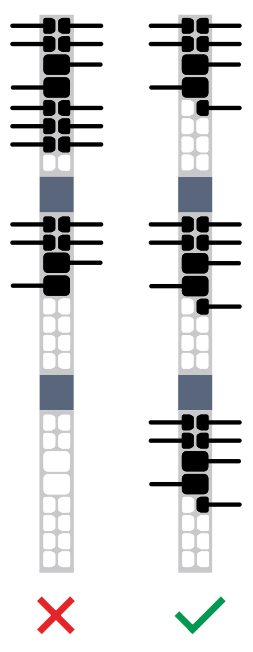
The Equinix Operations team connects and disconnects rack PDUs to power sockets under the raised floor or above the cabinets.
- With a three-phase rack PDU installed, connections to the hardware within the cabinet are balanced across all three phases. Correct phase balancing optimizes the electrical installation.
- With a single-phase rack installed, the load is balanced across the two 16A sections.
- For electrical safety, additional power extension cords are not allowed within the data center. The overhead infrastructure in shared colocation areas is not available for customer use.
If a rack installation does not comply with Equinix guidelines, Equinix requires the customer to make changes. Equinix can perform this work through a Smart Hands order, which is charged to the customer.
In-Rack ATS
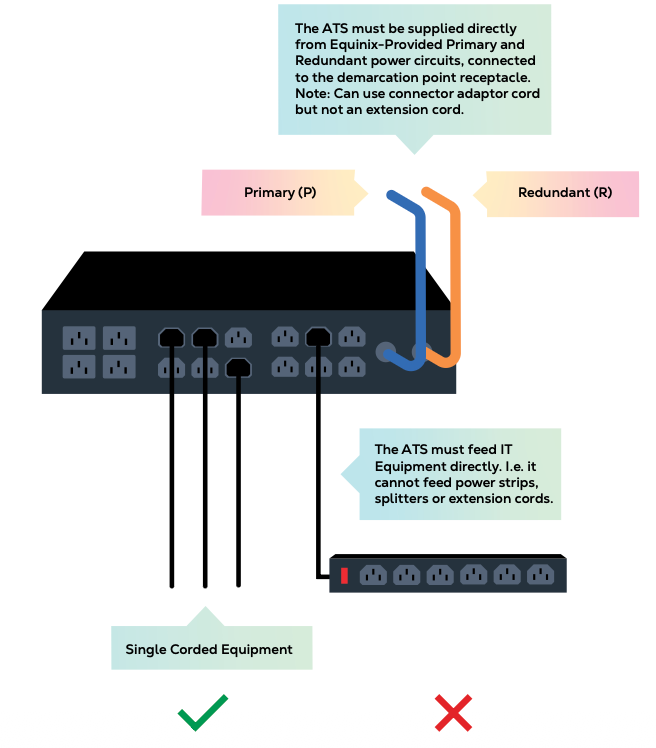
In-rack Automatic Transfer Switches (ATS) may be used under specific circumstances to support single-corded IT equipment.
Limitations
- In-rack ATS may only connect to single-corded IT equipment.
- Each ATS must be directly connected to a separate, dedicated Equinix-supplied redundant power circuit.
- Daisy chaining is not permitted, including connections with power strips, splitters, or other ATS units.
- In-line corded ATS units are not permitted, as they present risks similar to standard extension cords.
All ATS equipment must comply with applicable electrical standards, including relevant Underwriters Laboratories (UL) and International Electrotechnical Commission (IEC) requirements.
Logistics and storage guidelines
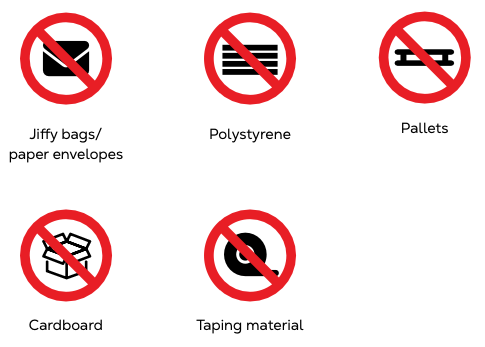
Combustible materials, including cardboard, are not permitted in the whitespace. Equipment is unpacked in the designated unpacking area. All packing material is disposed of in the waste management area. Hardware does not block escape routes or access to cabinets. Combustible materials left in a cage or cabinet are removed by Equinix and billed at standard Smart Hands rates.
Whitespace operations and compliance
Hot and cold aisle doors are closed immediately after use. Ventilation tiles and airflow at the cold and hot sides of the cabinet are not blocked. Access under the raised floor is restricted to Equinix employees only.
Remediation of non-conformances in existing customer deployments is required. The remediation approach is flexible and may use the components described here to meet the overall objective of ensuring the front face, cold aisle side of the cabinet is airtight and fully sealed.
When Equinix identifies policy violations, notifications are sent. IBX Admins receive notifications unless alternative contact preferences are configured in the Customer Portal.
Audits and compliance verification
Equinix conducts airflow management compliance audits periodically. Audit schedules are not published in advance. When an audit is required, Equinix will request access to the customer’s cage or cabinets to perform the assessment.
Customers may request an airflow management compliance audit at any time. Upon request, Equinix will arrange an audit through a billable Smart Hands service initiated via the Global Service Desk.
Remediation and enforcement process
When a non-conformance with this policy is identified, Equinix notifies the customer. The initial notification includes images of the issue, unless the customer has a strict no-photo policy in place. Customers are expected to review the requirements described in this policy and take the necessary actions to bring the affected cage or cabinet into compliance.
From day 7 after the initial notification, Equinix performs a first verification to confirm whether the issue has been resolved. If the issue remains unresolved, Equinix issues a Final Notification. The Final Notification provides a three-day period for the customer to remediate the issue.
After the remediation period expires, Equinix performs a second verification. If the issue is still not resolved, Equinix will initiate a billable Smart Hands order on the customer’s behalf to remediate the issue and restore compliance.
Customers may request an extension to the remediation timeline or request immediate remediation by Equinix, as described below.
Equinix does not enforce remediation actions that require power-down operations. In such cases, Equinix issues a recurring notice every 30 days until the issue can be resolved.
Remediation extensions
For containment-related non-conformances, including missing blanking panels and other required airflow management accessories, Equinix applies a standard 10-day remediation timeline. Customers may request up to two remediation extensions of 10 days each, for a maximum additional remediation period of 20 days, to resolve the issue independently.
Extension requests are submitted using the link provided in policy enforcement notification emails. The extension link included in the initial notification grants a first 10-day extension. The extension link included in the Final Notification grants a second 10-day extension.
If the customer has already received the Final Notification, only one 10-day extension is available and the first extension can no longer be used.
Upon submission of an extension request, Equinix issues a receipt email to confirm that the request has been logged.
Immediate remediation by Equinix
Customers may request Equinix to remediate identified airflow management non-conformances immediately. A request link is provided in policy enforcement notification emails. Customers must use this link to request immediate remediation to prevent duplicate or conflicting remediation actions.
Submitting this request initiates a billable Smart Hands order to resolve the issue. Use of the request link automatically stops any further policy enforcement notifications related to the identified non-conformance.
Equinix confirms order creation and remediation completion through standard communication channels and in the Equinix Customer Portal.
Equinix-initiated Smart Hands orders
If a customer receives a Smart Hands order related to airflow management policy enforcement that they did not request, this indicates that the identified non-conformance was not addressed following two policy enforcement notification emails.
In these cases, Equinix initiates a billable Smart Hands order on the customer’s behalf to remediate the issue and restore compliance. This action follows the completion of the notification and verification process described above.
Once initiated, the Smart Hands order cannot be canceled, as the work is required to mitigate ongoing operational and sustainability risks within the data center environment. If the Smart Hands order was raised in error, the customer must contact the Global Service Desk for review.
Policy enforcement notifications
Airflow management policy enforcement notifications are sent by email to the first listed Primary Admin associated with the affected cage or cabinet in the Equinix Customer Portal (ECP) who has Shipping Notifications enabled.
Notification preferences can be updated in the Customer Portal under Permissions or IBX Services Notifications. If no Primary Admins have Shipping Notifications enabled, notifications are sent to all Primary Admins associated with the relevant cage or cabinet.
Inverted airflow equipment exceptions
In cases where the customer is unable to remediate identified inverted airflow equipment, Equinix does not require remediation unless it directly impacts another customer or the overall data center environment. Equinix continues to issue notifications every 30 days to inform the customer that the equipment is operating at risk, and standard thermal Service Level Agreements may not apply.
Verification of remediation
Before issuing a Final Notification or, where applicable, initiating a Smart Hands order, Equinix performs verification checks to confirm whether the identified non-conformance has been resolved. Each enforcement case includes up to two verifications.
During verification, Equinix personnel assess the affected cage or cabinet to determine compliance. If the issue has been resolved, the enforcement process is closed. If the issue remains unresolved, Equinix proceeds with the next enforcement step, which may include issuing a Final Notification or initiating a billable Smart Hands order, as applicable.